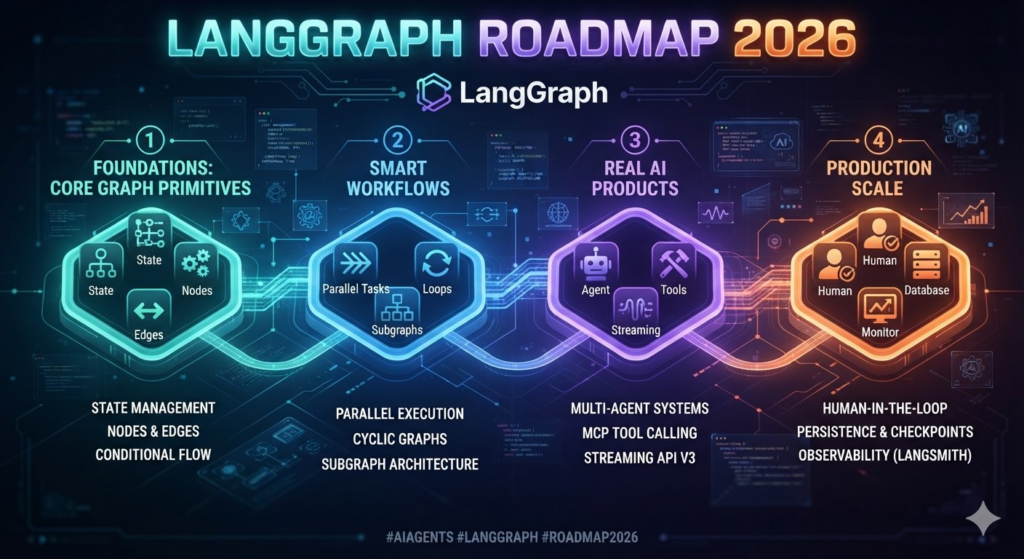
Meta Description: Learn the most important LangGraph concepts for building AI agents quickly in 2026, including state, nodes, edges, tools, memory, RAG, human-in-the-loop and multi-agent systems.
Focus Keyword: LangGraph roadmap 2026
Secondary Keywords: LangGraph tutorial, LangGraph AI agents, learn LangGraph, LangGraph agent development, LangGraph RAG, LangGraph multi-agent, LangGraph memory, LangGraph workflow
Suggested URL: /langgraph-roadmap-2026-ai-agent-development
Introduction
AI agents are moving beyond simple chatbots.
Modern agents can research information, call APIs, query databases, execute workflows, use external tools, remember previous interactions and ask humans for approval before taking sensitive actions.
But building reliable agents becomes significantly more complicated as workflows become more sophisticated.
This is where LangGraph becomes important.
LangGraph is designed for building stateful, multi-step AI applications using a graph-based architecture. Instead of treating an agent as one large prompt, developers can break its behavior into state, nodes and edges and explicitly control how information moves through the workflow.
If you want to learn LangGraph quickly, you don’t need to memorize the entire framework.
You need to master the concepts that appear repeatedly in real-world AI agent projects.
This guide provides a practical LangGraph learning roadmap for 2026.
What Is LangGraph?
LangGraph is an orchestration framework for building complex, stateful AI agent workflows.
At its core, LangGraph uses three fundamental concepts:
- State — the information available to the workflow
- Nodes — functions that perform work
- Edges — connections that determine what happens next
In simple terms:
Nodes do the work. Edges decide what happens next. State carries the information.
This architecture allows developers to create workflows that can branch, loop, pause, resume and coordinate multiple agents.
For example:
User
  ↓
Understand Request
  ↓
Router
  ↓
 ┌───────────────┐
 ↓               ↓
Search Web     Search DB
 ↓               ↓
 └───────┬───────┘
         ↓
      Generate
         ↓
       Review
         ↓
       Answer
This is fundamentally different from simply sending a prompt to an LLM.
Why Learn LangGraph in 2026?
The AI development ecosystem is moving from simple LLM calls toward agentic workflows.
Companies increasingly want AI systems that can:
- Take actions
- Use tools
- Access enterprise data
- Maintain state
- Follow business rules
- Handle failures
- Ask for human approval
- Coordinate multiple specialized agents
LangGraph is particularly useful when developers need more control over these workflows.
Its official ecosystem includes support for graph construction, checkpointing, persistent storage, subgraphs and agent-oriented tooling.
For developers who already know Python and basic LLM APIs, LangGraph can therefore be a valuable next step.
The 10 LangGraph Concepts You Should Learn First
Don’t attempt to learn everything simultaneously.
Focus on these ten areas.
1. State
State is the foundation of LangGraph.
It represents the information flowing through your application.
A simplified example:
from typing import TypedDict

class AgentState(TypedDict):
    question: str
    answer: str
    documents: list
A node can read the current state and return updates to it.
Think of state as the agent’s shared working memory.
What to learn
Understand:
- State schemas
- TypedDict
- Pydantic models
- State updates
- Reducers
- Message state
Once you understand state, many LangGraph concepts become much easier.
2. Nodes
A node is a function that performs an operation.
For example:
def research_node(state):
    # Search information
    return {"documents": ["document 1", "document 2"]}
A node could:
- Call an LLM
- Search a database
- Call an API
- Execute Python
- Retrieve documents
- Validate information
- Ask a human for approval
This makes nodes extremely flexible.
Important principle
Don’t put your entire agent inside one enormous function.
Break the workflow into logical nodes.
For example:
retrieve
   ↓
analyze
   ↓
generate
   ↓
validate
This makes debugging and maintenance much easier.
3. Edges
Nodes perform the work.
Edges determine where the workflow goes next.
A simple workflow could be:
START
  ↓
Research
  ↓
Generate
  ↓
END
But the real power appears with conditional routing.
For example:
             ┌──→ Web Search
             │
User → Router
             │
             └──→ Database
The router decides which path should execute.
LangGraph supports normal edges as well as conditional routing.
Learn these first
STARTEND- Normal edges
- Conditional edges
- Routing functions
4. Build Your First Agent
Once you understand state, nodes and edges, build a small agent.
Start with something extremely simple:
User
 ↓
LLM
 ↓
Answer
Then add complexity.
Version 1
User → LLM → Answer
Version 2
User → Router → LLM → Answer
Version 3
User
 ↓
Router
 ↓
Tool
 ↓
LLM
 ↓
Answer
Version 4
User
 ↓
Router
 ↓
Research
 ↓
Validation
 ↓
Answer
This progression is much better than trying to build a complex multi-agent system on day one.
5. Tool Calling
An AI agent becomes much more useful when it can interact with external systems.
For example:
AI Agent
   ↓
 ┌──────────────┐
 │              │
Search        Database
 │              │
API           CRM
 │              │
Calculator    Email
Tools can allow an agent to perform actions instead of simply generating text.
Learn how to connect agents to:
- REST APIs
- Databases
- Search
- Python functions
- CRM systems
- Internal enterprise services
- External SaaS platforms
Example use case
A customer support agent could:
- Read the customer’s question
- Search the knowledge base
- Check the customer’s account
- Generate a response
- Create a support ticket if necessary
That is much closer to a real enterprise agent.
6. Conditional Routing
This is one of the most important concepts for production agent development.
Suppose you are building an enterprise assistant.
The user asks:
“What is the status of my order?”
The system could route the request to an order-management tool.
But if the user asks:
“Explain your refund policy.”
The request could go to a knowledge-base retriever.
The workflow becomes:
                 ┌── Order API
                 │
User → Router ───┤
                 │
                 └── Knowledge Base
This is where LangGraph starts becoming much more powerful than a simple chatbot.
7. Memory and Persistence
A serious agent often needs to remember information.
LangGraph distinguishes between short-term conversational state and longer-term memory/storage patterns.
Persistence allows graph state to be checkpointed, which supports features such as conversational memory, human-in-the-loop workflows, recovery and replay/debugging.
For example:
Conversation 1
      ↓
User preferences
      ↓
Saved
      ↓
Conversation 2
      ↓
Agent retrieves relevant information
Learn
- Checkpointers
- Threads
- Short-term memory
- Long-term memory
- Store
- PostgreSQL persistence
For local experiments, in-memory persistence can be useful.
For production, you should understand durable storage.
8. Human-in-the-Loop
This is one of the most important enterprise concepts.
You don’t always want an AI agent to make the final decision.
Consider:
AI Agent
   ↓
Generate Refund
   ↓
Human Approval
   ↓
Process Refund
LangGraph’s interrupt mechanism can pause graph execution, persist the relevant state and wait for external input before continuing.
This is useful for:
- Financial transactions
- Refunds
- Legal workflows
- Database modifications
- Customer communications
- Security-sensitive operations
The pattern is:
AI
 ↓
Decision
 ↓
Human
 ↓
Approve / Reject
 ↓
Continue
This is particularly valuable in enterprise AI.
9. RAG + LangGraph
If you want to build enterprise AI applications, learn RAG alongside LangGraph.
RAG stands for Retrieval-Augmented Generation.
A basic architecture looks like:
User Question
      ↓
Retriever
      ↓
Vector Database
      ↓
Relevant Documents
      ↓
LLM
      ↓
Answer
LangGraph can orchestrate the complete workflow.
For example:
Question
   ↓
Classify
   ↓
Retrieve Documents
   ↓
Check Relevance
   ↓
 ┌───────────────┐
 │ Relevant?     │
 └───────┬───────┘
       Yes/No
        ↓
 Generate Answer
Learn these technologies
You don’t need all of them.
Start with:
- Embeddings
- Vector databases
- Chunking
- Retrieval
- Reranking
- Metadata filtering
- Context management
Then combine them with LangGraph.
10. Multi-Agent Systems
After mastering single-agent workflows, move to multi-agent architectures.
A simple example:
             Supervisor
                 ↓
       ┌─────────┼─────────┐
       ↓         ↓         ↓
   Research    Coding    Analysis
     Agent      Agent      Agent
       ↓         ↓         ↓
       └─────────┼─────────┘
                 ↓
             Supervisor
                 ↓
              Result
Each agent specializes in a specific task.
For example, an enterprise research system could have:
Research Agent
Finds information.
Data Agent
Analyzes structured data.
Writer Agent
Creates the report.
Reviewer Agent
Checks the final output.
LangGraph supports customizable single-agent, multi-agent and hierarchical workflows.
What About Subgraphs?
Once you understand multi-agent workflows, learn subgraphs.
A subgraph allows you to encapsulate part of a larger workflow.
Think of it as:
Main Graph
    ↓
Research Subgraph
    ↓
Analysis Subgraph
    ↓
Reporting Subgraph
This can make large applications easier to organize.
LangGraph documentation also describes subgraph patterns for multi-agent systems and state persistence.
You don’t need subgraphs on your first day.
Learn them after you understand basic graphs.
LangGraph Learning Roadmap
Here is the fastest practical sequence.
| Level | Learn | Priority |
|---|---|---|
| 1 | Python fundamentals | ⭐⭐⭐⭐⭐ |
| 2 | LLM APIs | ⭐⭐⭐⭐⭐ |
| 3 | State | ⭐⭐⭐⭐⭐ |
| 4 | Nodes | ⭐⭐⭐⭐⭐ |
| 5 | Edges | ⭐⭐⭐⭐⭐ |
| 6 | Conditional routing | ⭐⭐⭐⭐⭐ |
| 7 | Tool calling | ⭐⭐⭐⭐⭐ |
| 8 | Memory & persistence | ⭐⭐⭐⭐ |
| 9 | RAG | ⭐⭐⭐⭐ |
| 10 | Human-in-the-loop | ⭐⭐⭐⭐ |
| 11 | Multi-agent systems | ⭐⭐⭐⭐ |
| 12 | Subgraphs | ⭐⭐⭐ |
| 13 | Production deployment | ⭐⭐⭐⭐⭐ |
| 14 | Monitoring & evaluation | ⭐⭐⭐⭐⭐ |
What You DON’T Need to Learn Immediately
A common mistake is trying to learn every LangGraph feature before building anything.
You don’t need to start with:
- Complex multi-agent architectures
- Advanced graph patterns
- Kubernetes
- Distributed systems
- Complex memory architectures
- Every vector database
- Every LLM provider
Instead, build progressively.
Start with:
State → Node → Edge → Tool → Conditional Routing
Then move to:
Persistence → RAG → Human Approval → Multi-Agent
Finally:
Deployment → Monitoring → Evaluation → Security
5 LangGraph Projects You Should Build
The fastest way to learn LangGraph is by building projects.
Project 1: Customer Support Agent
Build:
Question
 ↓
Knowledge Base
 ↓
Answer
 ↓
Escalate if necessary
Learn:
- State
- Nodes
- Edges
- RAG
- Routing
Project 2: Research Agent
Build an agent that:
- Understands a research question
- Searches multiple sources
- Collects information
- Summarizes findings
- Produces a report
Learn:
- Tool calling
- Loops
- State
- Structured output
Project 3: SQL Agent
Build:
Natural Language
       ↓
SQL Generation
       ↓
SQL Validation
       ↓
Database
       ↓
Result
       ↓
Explanation
This is particularly useful for enterprise applications.
Project 4: Human Approval Agent
Build an agent that:
AI Decision
    ↓
Approval Required
    ↓
Human
   ↙ ↘
Approve Reject
    ↓
Continue
This teaches you how real business workflows can combine automation with human control.
Project 5: Multi-Agent Research System
Build:
Supervisor
    ↓
Research Agent
    ↓
Data Agent
    ↓
Fact Checker
    ↓
Writer
    ↓
Final Report
This project combines most of the important LangGraph concepts.
LangGraph vs Simple LLM API
You don’t need LangGraph for every AI application.
For example:
User → Prompt → LLM → Answer
doesn’t necessarily require a graph framework.
But consider:
User
 ↓
Classify
 ↓
Retrieve
 ↓
Call API
 ↓
Validate
 ↓
Ask Human
 ↓
Retry
 ↓
Generate
 ↓
Save
Now explicit workflow orchestration becomes much more valuable.
The key question isn’t:
“Should I use LangGraph?”
It is:
“Does my AI application require controlled, stateful, multi-step execution?”
If the answer is yes, LangGraph becomes much more interesting.
LangGraph for Enterprise AI
Enterprise applications introduce requirements that simple chatbot architectures often don’t handle well.
Companies may need:
- Authentication
- Authorization
- Audit trails
- Persistent state
- Human approval
- Error recovery
- Observability
- Data governance
- Cost controls
- Security
Persistence and checkpointing are particularly important because they can allow workflows to recover from failures and resume from saved state.
And human-in-the-loop workflows can introduce explicit approval before sensitive operations.
Production Skills You Should Learn After LangGraph Basics
Once you can build an agent locally, don’t stop there.
Learn:
Python
You should be comfortable reading and modifying Python.
APIs
Understand REST APIs, authentication and j son.
Databases
Learn PostgreSQL and basic SQL.
Docker
Understand containerized deployment.
Cloud
Choose one:
- AWS
- Microsoft Azure
- Google Cloud
Observability
Learn how to trace and evaluate agent execution.
Security
Understand:
- Secrets management
- Authentication
- Authorization
- Prompt injection
- Tool permissions
- Data access controls
Production AI agents need more than good prompts.
A Practical 30-Day LangGraph Learning Plan
Week 1 — Fundamentals
Learn:
- Python basics
- LLM APIs
- LangChain fundamentals
- State
- Nodes
- Edges
Goal: Build a basic graph.
Week 2 — Agents
Learn:
- Tool calling
- Conditional routing
- Loops
- Structured outputs
- Agent patterns
Goal: Build a tool-using agent.
Week 3 — Production Patterns
Learn:
- Persistence
- Memory
- RAG
- Human-in-the-loop
- Error handling
Goal: Build an enterprise-style agent.
Week 4 — Advanced
Learn:
- Multi-agent systems
- Subgraphs
- Streaming
- Evaluation
- Deployment
- Monitoring
Goal: Build and deploy a complete AI application.
The Most Important LangGraph Skills in 2026
If you have limited time, prioritize these:
Tier 1 — Must Know
State
Nodes
Edges
Conditional routing
Tool calling
Tier 2 — Production Skills
Persistence
Memory
RAG
Human-in-the-loop
Error handling
Tier 3 — Advanced
Multi-agent systems
Subgraphs
Deployment
Evaluation
Observability
This sequence gives you a much faster path to building useful AI agents than trying to learn the entire LangGraph ecosystem at once.
Final Takeaway
LangGraph can look complicated when you first encounter graphs, state, reducers, checkpoints, interrupts and multi-agent architectures.
But the learning curve becomes much easier when you break it into layers.
Start with:
State → Nodes → Edges → Tools → Routing
Then learn:
Memory → Persistence → RAG → Human-in-the-loop
Finally move to:
Multi-Agent → Subgraphs → Deployment → Evaluation
The most important shift is to stop thinking of an AI agent as simply an LLM with a prompt.
A production agent is better understood as a controlled software workflow in which an LLM can reason, use tools, update state and make decisions inside a defined execution architecture.
That is where LangGraph becomes especially powerful.
And if your goal is fast AI agent development, you don’t need to become a LangGraph expert before building your first application.
Build one small agent.
Then add a tool.
Then add routing.
Then add memory.
Then add human approval.
Then turn it into a production system.
That progression will teach you far more than reading documentation from beginning to end.
However, the ideal platform depends on your cloud strategy:
- Azure AI Search → Best overall enterprise RAG platform
- Vertex AI Search → Best for Google Cloud users
- Elastic → Best for large-scale search workloads
- Weaviate → Best open-source AI-native solution
The future belongs to organizations that can connect AI models with trusted enterprise knowledge, and the right RAG platform is the foundation of that transformation.
If you enjoyed this article, you may also like:
- 5 AI Gateways That Offer Free Tokens in 2026
- How to Build a Humanoid Robot in 2026: Costs, Timeline & Complete Blueprint
- Best AI Research Tools in 2026: ChatGPT, Claude, Gemini & Perplexity
- Best AI Resume Builders in 2026 — Free
- ChatGPT Review — Is It Worth Paying For in 2026?
- 10 Best Free AI Tools You Should Use in 2026
- Best AI Video Generators in 2026 — Free and Paid
- Best AI for Students in 2026: Top 10 Tools for Learning
- How AI Learns From Humans to Build Physical Robots
- How AI Learns From Humans to Build Physical Robots
- Why LangGraph Is So Popular in Enterprises — Pros, Cons & Real-World Use Cases in 2026
- ChatGPT vs Gemini vs Claude vs Grok 2026
- DeepSeek V4 vs Grok 4 vs Claude Opus 5 vs Nvidia Nemotron vs Gemini 2.5 Pro — The Ultimate AI Model Comparison for 2026
- AI Agent and LLM Frameworks Comparison 2026: LangChain vs LangGraph vs CrewAI vs AutoGen vs LlamaIndex vs Semantic Kernel
- Best Multi-Agent AI Platforms in 2026: CrewAI vs AutoGen vs LangGraph vs OpenAI Agents SDK vs Agno vs Semantic Kernel
- Best AI Development Platforms in 2026: OpenAI API vs Anthropic API vs Google AI Studio vs Vertex AI vs Azure AI Foundry vs AWS Bedrock vs Hugging Face
- Exploring the Latest AI Tools and Technologies
- How to Use ChatGPT for Business — A Complete Beginner Guide
- How to Write Blog Posts with AI — A Proven Step-by-Step Guide
- Best AI Coding Assistants 2026
- Ultimate Guide to the 10 Best AI Chatbots in 2026
- Claude AI Review — Best ChatGPT Alternative in 2026
- Jasper AI Review — Is It Worth $49/Month in 2026?
- How to Use AI for Social Media Marketing — Complete Guide
- AI Tools for Small Business Owners — Save 10 Hours/Week
- AI Tools for Content Creators
- Best AI Music Generators in 2026 — Create Songs in Minutes
- AI Design Tools Compared: Canva AI vs Adobe Firefly vs Midjourney
- Best AI Writing Tools 2026
- 10 Free AI Tools You Should Try in 2026
- Best AI Image Generators in 2026 — Free and Paid Compared
- Best AI Productivity Tools in 2026 — Work Smarter, Not Harder
- ChatGPT vs Claude in 2026 — Which AI Is Actually Better?
- ChatGPT vs Gemini vs Claude vs Grok (2026): Which AI Assistant Should You Actually Use?
Visit Aidacoit.com for more AI comparisons, practical AI tutorials, enterprise AI insights, and emerging technology trends