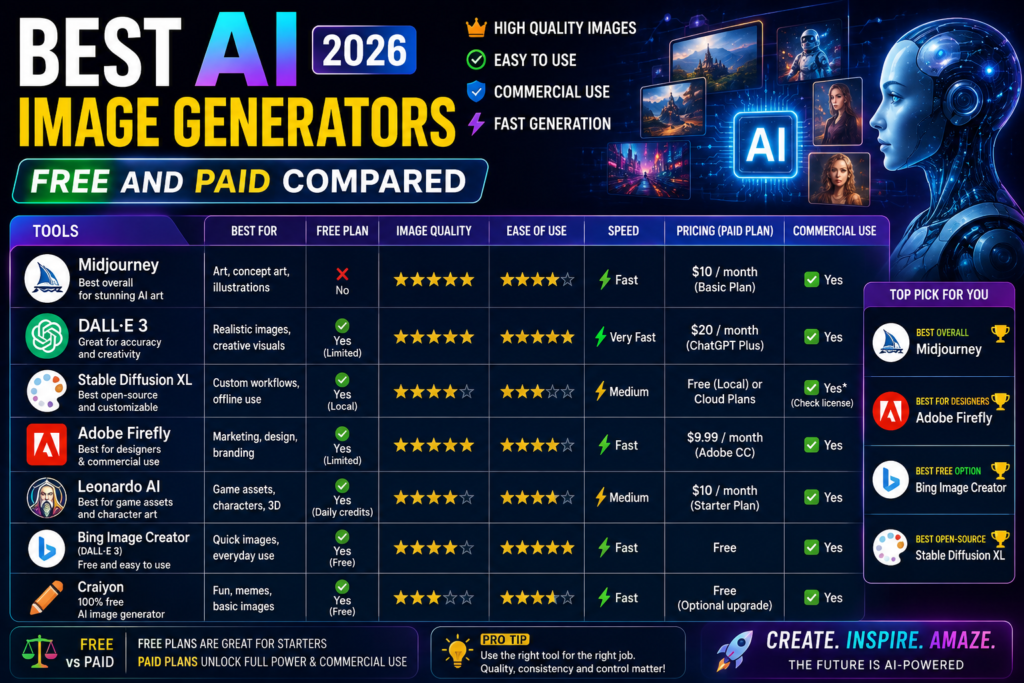
AI image generators have become incredibly powerful. You can now create professional-quality images in seconds without any design skills. But with so many options available, choosing the right one is confusing.
We tested 8 popular AI image generators and compared them on image quality, pricing, speed, and ease of use.
1. Midjourney — Best Overall Quality
Midjourney produces the most visually stunning AI images. It is the go-to choice for artists, designers, and creative professionals.
What we liked:
- Best image quality among all tools
- Excellent at artistic and stylized images
- Active community for inspiration
- Regular model updates
What we did not like:
- No free tier available
- Discord-based interface can be confusing
- Slower generation during peak hours
Pricing: Basic plan at $10 per month, Standard at $30 per month
Best for: Artists, designers, creative professionals
2. DALL-E 3 — Best Integration with ChatGPT
DALL-E 3 by OpenAI is built directly into ChatGPT. You can generate images using simple text descriptions within a conversation.
What we liked:
- Available inside ChatGPT Plus
- Very accurate at following text prompts
- Good at text rendering in images
- Simple and easy to use
What we did not like:
- Less artistic than Midjourney
- Strict content filters
- Limited style options
- Requires ChatGPT Plus subscription
Pricing: Included with ChatGPT Plus at $20 per month
Best for: ChatGPT users, casual creators, quick image needs
3. Leonardo AI — Best Free Option
Leonardo AI offers daily free credits for image generation. It provides multiple AI models and editing tools making it a strong free alternative.
What we liked:
- 150 free tokens daily
- Multiple AI models to choose from
- Image editing and upscaling tools
- Community gallery for prompts
What we did not like:
- Daily token limit on free plan
- Some premium models require paid access
- Occasional inconsistencies in output
Pricing: Free tier available, paid plans start at $12 per month
Best for: Budget-conscious creators, social media managers
4. Adobe Firefly — Best for Commercial Use
Adobe Firefly is trained only on licensed content making it safe for commercial use. It integrates directly with Photoshop and other Adobe apps.
What we liked:
- Commercially safe content
- Integration with Adobe Creative Cloud
- Text effects and style transfer
- High quality output
What we did not like:
- Requires Adobe subscription for full features
- Less creative freedom than Midjourney
- Slower than competitors
Pricing: Free tier with 25 credits monthly, Premium at $4.99 per month
Best for: Professional designers, businesses, commercial projects
5. Stable Diffusion — Best for Customization
Stable Diffusion is open source meaning you can run it locally on your computer for free. It offers maximum control over image generation.
What we liked:
- Completely free and open source
- Run locally without internet
- Thousands of custom models and styles
- Full control over generation parameters
What we did not like:
- Requires powerful GPU for local use
- Steep learning curve
- No built-in interface
- Results vary by model and settings
Pricing: Free open source, Cloud services from $10 per month
Best for: Tech-savvy users, developers, enthusiasts
6. Ideogram — Best for Text in Images
Ideogram excels at generating images with accurate text. If you need signs, logos, or images with written content it is the best choice.
What we liked:
- Most accurate text rendering
- Free tier with daily generations
- Good variety of styles
- Simple interface
What did not like:
- Less control over fine details
- Occasional spelling errors in text
- Smaller community than competitors
Pricing: Free tier available, Plus plan at $8 per month
Best for: Logo designers, social media content, marketing materials
7. Canva AI — Best for Beginners
Canva integrates AI image generation directly into its design platform. You can generate images and immediately use them in designs.
What we liked:
- Integrated with design tools
- Very beginner friendly
- Text to image with style options
- Direct use in social media templates
What we did not like:
- Limited AI generation on free plan
- Less creative control
- Output quality below Midjourney
- Requires Canva Pro for best features
Pricing: Free with limited AI, Pro at $12.99 per month
Best for: Beginners, social media managers, non-designers
8. Flux — Best for Photorealism
Flux by Black Forest Labs creates the most photorealistic AI images. It is excellent for product mockups and realistic scenes.
What we liked:
- Most realistic outputs
- Fast generation speed
- Available through multiple platforms
- Good at faces and hands
What we did not like:
- Less artistic style options
- Newer tool with smaller community
- Limited free access
Pricing: Varies by platform, some free access available
Best for: Product photography, realistic scenes, professional use
Comparison Table
| Tool | Price | Free Tier | Best For | Quality |
|---|---|---|---|---|
| Midjourney | $10/mo | No | Artistic images | 5/5 |
| DALL-E 3 | $20/mo | No | Quick generation | 4.3/5 |
| Leonardo AI | $12/mo | Yes | Budget creators | 4.4/5 |
| Adobe Firefly | $4.99/mo | Yes | Commercial use | 4.2/5 |
| Stable Diffusion | Free | Yes | Customization | 4.5/5 |
| Ideogram | $8/mo | Yes | Text in images | 4.0/5 |
| Canva AI | $12.99/mo | Yes | Beginners | 3.8/5 |
| Flux | Varies | Limited | Photorealism | 4.6/5 |
Final Verdict
For the best quality choose Midjourney. For free use pick Leonardo AI. For commercial safety go with Adobe Firefly. For maximum control use Stable Diffusion.
Most users will be happy with Leonardo AI for free or Midjourney for paid. Start there and explore others based on your specific needs.
If you enjoyed this article, you may also like:
- 5 AI Gateways That Offer Free Tokens in 2026
- How to Build a Humanoid Robot in 2026: Costs, Timeline & Complete Blueprint
- Best AI Research Tools in 2026: ChatGPT, Claude, Gemini & Perplexity
- Best AI Resume Builders in 2026 — Free
- ChatGPT Review — Is It Worth Paying For in 2026?
- 10 Best Free AI Tools You Should Use in 2026
- Best AI Video Generators in 2026 — Free and Paid
- Best AI for Students in 2026: Top 10 Tools for Learning
- How AI Learns From Humans to Build Physical Robots
- How AI Learns From Humans to Build Physical Robots
- Why LangGraph Is So Popular in Enterprises — Pros, Cons & Real-World Use Cases in 2026
- ChatGPT vs Gemini vs Claude vs Grok 2026
- DeepSeek V4 vs Grok 4 vs Claude Opus 5 vs Nvidia Nemotron vs Gemini 2.5 Pro — The Ultimate AI Model Comparison for 2026
- AI Agent and LLM Frameworks Comparison 2026: LangChain vs LangGraph vs CrewAI vs AutoGen vs LlamaIndex vs Semantic Kernel
- Best Multi-Agent AI Platforms in 2026: CrewAI vs AutoGen vs LangGraph vs OpenAI Agents SDK vs Agno vs Semantic Kernel
- Best AI Development Platforms in 2026: OpenAI API vs Anthropic API vs Google AI Studio vs Vertex AI vs Azure AI Foundry vs AWS Bedrock vs Hugging Face
- Exploring the Latest AI Tools and Technologies
- How to Use ChatGPT for Business — A Complete Beginner Guide
- How to Write Blog Posts with AI — A Proven Step-by-Step Guide
- Best AI Coding Assistants 2026
- Ultimate Guide to the 10 Best AI Chatbots in 2026
- Claude AI Review — Best ChatGPT Alternative in 2026
- Jasper AI Review — Is It Worth $49/Month in 2026?
- How to Use AI for Social Media Marketing — Complete Guide
- AI Tools for Small Business Owners — Save 10 Hours/Week
- AI Tools for Content Creators
- Best AI Music Generators in 2026 — Create Songs in Minutes
- AI Design Tools Compared: Canva AI vs Adobe Firefly vs Midjourney
- Best AI Writing Tools 2026
- 10 Free AI Tools You Should Try in 2026
- Best AI Image Generators in 2026 — Free and Paid Compared
- Best AI Productivity Tools in 2026 — Work Smarter, Not Harder
- ChatGPT vs Claude in 2026 — Which AI Is Actually Better?
Visit Aidacoit.com for more AI comparisons, practical AI tutorials, enterprise AI insights, and emerging technology trends.
Pingback: 10 Best AI Video Generators in 2026
Pingback: Claude AI Review — Best ChatGPT Alternative in 2026? - Aidacoit
Pingback: Jasper AI Review — Is It Worth $49/Month in 2026? - Aidacoit
Pingback: Aidacoit.com Aidacoit - Aidacoit.com Aidacoit Aidacoit.com
Pingback: ChatGPT vs Gemini vs Claude vs Grok – Which AI Should You Actually Use in 2026? - Aidacoit
Pingback: Best AI Development Platforms in 2026 - Aidacoit
Pingback: AI Agents & Automation Explained (2026) – Complete Enterprise & Business Guide