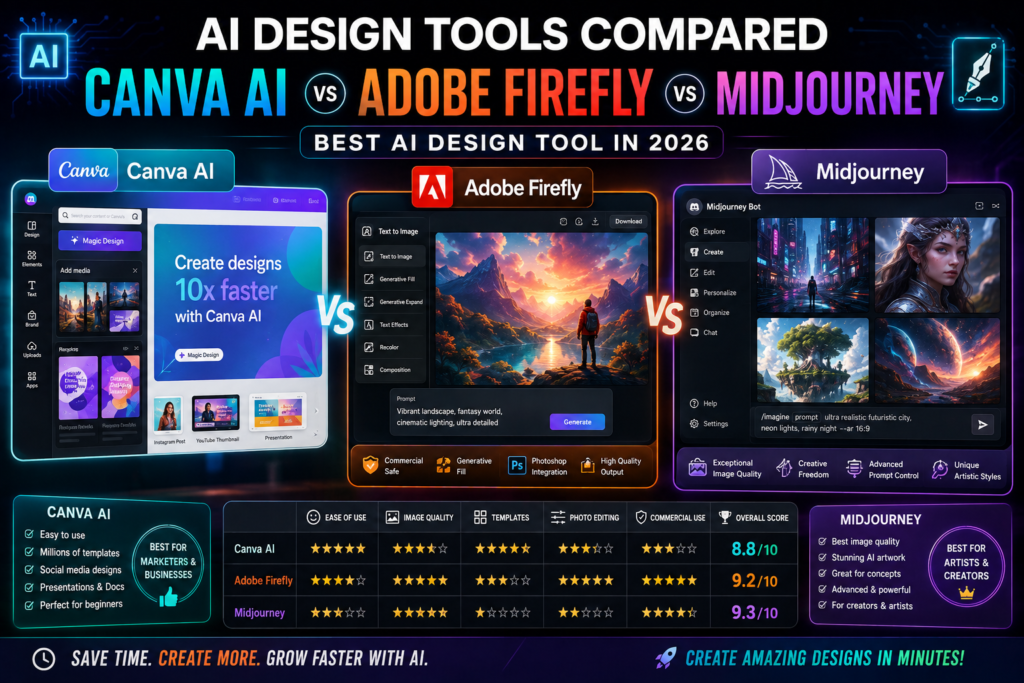
AI has changed the way people create images, graphics and marketing content.
A few years ago, creating a professional-looking social media post, advertisement, presentation or concept image often required design software and considerable experience. Today, AI design tools can help generate visuals, edit images and accelerate creative workflows in minutes.
But there is one problem:
Which AI design tool should you actually use?
Three names that frequently come up are canvass AI, Adobe Firefly and Midjourney.
All three can help with creative work, but they are designed for different types of users.
canvass focuses heavily on easy-to-use design and complete visual workflows. Adobe Firefly is closely connected to Adobe’s broader creative ecosystem and offers generative image, video, audio and vector capabilities. Midjourney is particularly focused on AI-generated visual creation and artistic exploration.
So, which one is best?
In this guide, we’ll compare canvass AI vs Adobe Firefly vs Midjourney based on features, ease of use, creative control, business use cases, learning curve and overall value.
canvass AI vs Adobe Firefly vs Midjourney: Quick Comparison
| Feature | Canva AI | Adobe Firefly | Midjourney |
|---|---|---|---|
| Ease of use | ⭐⭐⭐⭐⭐ | ⭐⭐⭐⭐ | ⭐⭐⭐ |
| AI image generation | ⭐⭐⭐⭐ | ⭐⭐⭐⭐ | ⭐⭐⭐⭐⭐ |
| Templates | ⭐⭐⭐⭐⭐ | ⭐⭐⭐ | ⭐ |
| Social media designs | ⭐⭐⭐⭐⭐ | ⭐⭐⭐⭐ | ⭐⭐ |
| Marketing materials | ⭐⭐⭐⭐⭐ | ⭐⭐⭐⭐⭐ | ⭐⭐⭐ |
| Creative exploration | ⭐⭐⭐⭐ | ⭐⭐⭐⭐⭐ | ⭐⭐⭐⭐⭐ |
| Editing workflow | ⭐⭐⭐⭐⭐ | ⭐⭐⭐⭐⭐ | ⭐⭐⭐ |
| Professional design ecosystem | ⭐⭐⭐⭐ | ⭐⭐⭐⭐⭐ | ⭐⭐⭐ |
| Beginner friendly | ⭐⭐⭐⭐⭐ | ⭐⭐⭐⭐ | ⭐⭐⭐ |
| Best for | Everyday design | Professional creative work | AI image creation |
This table is a practical comparison rather than a universal ranking. The “best” tool depends heavily on what you’re trying to create.
1. canvass AI — Best for Everyday Design
canvass has become one of the most accessible design platforms for people who aren’t professional designers.
Its AI capabilities are integrated directly into the canvass design environment, making it possible to combine AI generation with templates, editing tools, presentations, social media designs and other visual content.
canvass’s current AI direction has expanded further with canvass AI 2.0, which canvass describes as a conversational, agentic creative experience capable of producing editable, layered designs from prompts.
What canvass AI Is Good At
canvass is particularly useful for:
- YouTube thumbnails
- Instagram posts
- Facebook graphics
- Presentations
- Posters
- Flyers
- Business documents
- Marketing materials
- Social media campaigns
- Simple videos
- Brand assets
Its Magic Studio ecosystem includes AI-powered design generation, image editing, writing and media-generation features.
Biggest Advantage
Simplicity.
You don’t need to understand complicated image-generation parameters to create useful designs.
You can start with a template, upload an image or describe what you want and then continue editing the result inside canvass.
Biggest Disadvantage
If your primary goal is producing highly artistic, cinematic or experimental AI imagery, dedicated image-generation platforms may give you more creative depth.
Best For
Beginners, content creators, small businesses, marketers and social media managers.
Our Verdict
★★★★★ for everyday design
If you need to create useful business or social media graphics quickly, canvass AI is probably the easiest starting point.
2. Adobe Firefly — Best for Professional Creative Workflows
Adobe Firefly takes a different approach.
Instead of being primarily a simple design platform, Firefly sits within Adobe’s broader creative ecosystem.
Adobe currently positions Firefly as a platform covering image, video, audio and vector generation, while its newer Firefly AI Assistant can orchestrate creative workflows involving tools such as photos-hop, Illustrator, Lightroom and Premiere.
What Adobe Firefly Is Good At
Firefly can be useful for:
- Image generation
- Image editing
- Generative fill
- Creative concepts
- Marketing visuals
- Background creation
- Product imagery
- Video-related creative work
- Vector graphics
- Professional design workflows
Biggest Advantage
Integration with Adobe’s creative ecosystem.
If you already use photos-hop, Illustrator or other Adobe applications, Firefly can fit naturally into an existing professional workflow.
This can be especially valuable for designers and creative teams that need more control than a basic template-based platform provides.
Biggest Disadvantage
The Adobe ecosystem can feel more complicated for someone who has never used professional design software.
A beginner who simply wants to create an Instagram post may find canvass easier.
Best For
Professional designers, agencies, marketers, photographers and creative teams.
Our Verdict
★★★★★ for professional creative workflows
If you’re already invested in Adobe’s ecosystem, Firefly becomes a particularly compelling option.
3. Midjourney — Best for AI-Generated Visuals
Midjourney has built a strong reputation around AI-generated imagery.
Rather than focusing primarily on templates and conventional design workflows, Midjourney is especially useful when you want to explore visual ideas from prompts.
It can be used for:
- Concept art
- Character concepts
- Fantasy artwork
- Product concepts
- Editorial visuals
- Cinematic scenes
- Creative photography
- Mood boards
- Visual experimentation
Midjourney’s current platform includes image and video creation capabilities, personalization and different generation modes. Its documentation currently lists multiple subscription tiers and features such as Relax Mode and Stealth Mode on higher plans.
Biggest Advantage
Creative visual quality and exploration.
If you have an idea in your head and want to explore different visual interpretations, Midjourney can be extremely powerful.
For example:
“A futuristic Indian city at sunset, cinematic photography, realistic architecture, atmospheric lighting.”
A prompt like this can produce several visual directions that you can refine.
Biggest Disadvantage
Midjourney isn’t primarily a complete business-design suite.
If you need to create a presentation, resize a design for multiple social platforms, add text, arrange logos and produce a complete marketing campaign, canvass may be more convenient.
Best For
Artists, visual creators, concept designers, photographers and creators who prioritize AI-generated imagery.
Our Verdict
★★★★★ for creative AI imagery
If your main goal is generating impressive visual concepts rather than building complete marketing designs, Midjourney is one of the strongest choices.
canvass AI vs Firefly vs Midjourney: Ease of Use
For beginners, ease of use can matter more than raw AI capability.
canvass AI
canvass is the easiest of the three for most beginners.
The interface is familiar, visual and template-driven.
Winner: canvass
Adobe Firefly
Firefly is relatively approachable, particularly for people already familiar with Adobe products.
However, the broader Adobe ecosystem can have a steeper learning curve.
Winner: Adobe Firefly for experienced designers
Midjourney
Midjourney has become more accessible through its web interface, but getting consistently good results still requires understanding prompting, references and visual direction.
Winner: Midjourney for experienced AI-image creators
Which Tool Produces the Best AI Images?
This is one of the most difficult questions to answer because “best” depends on the style you’re looking for.
For artistic and highly creative image generation:
Midjourney → Excellent
For image generation combined with professional editing:
Adobe Firefly → Excellent
For quick graphics that combine AI-generated content with layouts, text and templates:
canvass AI → Excellent
So instead of asking:
“Which AI generates the best image?”
ask:
“What do I want to do with the image after generating it?”
That’s often the more useful question.
Which Is Best for YouTube Thumbnails?
For YouTube creators, canvass AI is usually the easiest option.
Why?
Because creating a thumbnail isn’t just about generating an image.
You also need:
- Large headline text
- Subject placement
- Background
- Branding
- Logos
- Shapes
- Icons
- Multiple versions
- Correct dimensions
canvass combines these elements in one design environment.
Midjourney can be useful for generating the background or main visual.
Adobe Firefly can be useful when you need more advanced image manipulation.
Best combination
Midjourney/Firefly → Generate visual
↓
canvass → Build final thumbnail
This hybrid workflow can be more effective than trying to force one tool to do everything.
Which Is Best for Social Media?
For Instagram, Facebook, LinkedIn and other social platforms, canvass has a significant practical advantage.
You can create one design and adapt it to different formats.
For example:
Instagram post
↓
Instagram Story
↓
Facebook post
↓
LinkedIn graphic
↓
Presentation
This is where a complete design platform becomes more useful than a pure image generator.
Winner: canvass AI
Which Is Best for Professional Designers?
If you’re a professional designer or already use Adobe products, Firefly deserves serious consideration.
Adobe’s AI tools are increasingly integrated with its wider creative software ecosystem.
Firefly’s newer AI Assistant is designed to help coordinate creative tasks across Adobe applications, including photos-hop, Illustrator, Lightroom and Premiere.
Winner: Adobe Firefly
Which Is Best for AI Artists?
If your primary interest is visual experimentation, Midjourney is the natural choice among these three.
You can explore:
- Different art styles
- Cinematic compositions
- Fantasy worlds
- Characters
- Architecture
- Fashion concepts
- Product concepts
- Editorial imagery
Midjourney also offers personalization and reference-oriented workflows that can help creators develop a more consistent visual direction.
Winner: Midjourney
canvass AI vs Adobe Firefly vs Midjourney: Pricing Considerations
Pricing changes frequently, so it’s better to check each provider’s current pricing page before subscribing.
Midjourney currently lists four main subscription tiers — Basic, Standard, Pro and Mega — with monthly prices of $10, $30, $60 and $120 respectively at the time of this comparison. Annual billing is discounted.
canvass and Adobe offer different plans and usage limits depending on the features you need.
For business users, don’t compare only the monthly subscription price.
Also consider:
- AI usage limits
- Commercial usage terms
- Storage
- Templates
- Editing capabilities
- Collaboration
- Brand management
- Existing software subscriptions
- Export options
A slightly more expensive tool may actually be cheaper if it replaces several other applications.
Commercial Use: What Should You Check?
This is important if you’re creating content for a business.
Before using AI-generated content commercially, check the current terms of the platform you’re using.
Pay particular attention to:
- Commercial-use rights
- Copyright considerations
- Privacy
- Content ownership
- Stock asset licenses
- AI training policies
- Trademark issues
- Usage restrictions
For example, Midjourney’s current documentation states that subscribers generally have commercial usage rights for their creations, subject to its terms, and notes additional requirements for companies above a specified revenue threshold.
Rules and product terms can change, so always verify the current terms before using AI-generated assets in important commercial projects.
Which AI Design Tool Is Best for Beginners?
If you’re completely new to AI design:
Start with canvass AI.
It’s easier to understand because you don’t have to learn everything about prompting before producing something useful.
You can start with:
Template → AI → Edit → Export
Once you become comfortable with AI image generation, you can experiment with Firefly or Midjourney.
Which AI Design Tool Is Best for Businesses?
For a small business that needs:
- Social media graphics
- Presentations
- Flyers
- Marketing material
- Ads
- Brand content
canvass AI is likely the most practical starting point.
For a professional creative agency or design team:
Adobe Firefly may be a better fit, especially if the team already uses Adobe Creative Cloud.
For highly creative campaign imagery:
Midjourney can be an excellent image-generation component.
A Better Strategy: Use More Than One Tool
You don’t necessarily have to choose only one.
In fact, many creators can get better results by combining tools.
For example:
Workflow 1 — Content Creator
Midjourney
Generate a unique visual.
↓
canvass
Create the final YouTube thumbnail.
↓
canvass
Create social media versions.
Workflow 2 — Professional Designer
Adobe Firefly
Generate or modify the concept.
↓
photos-hop
Fine-tune the image.
↓
Illustrator
Create supporting vector assets.
↓
Premiere
Create video content.
Workflow 3 — Small Business
canvass AI
Generate the initial concept.
↓
canvass
Apply branding.
↓
canvass
Create multiple social formats.
↓
Export
Publish across platforms.
The Biggest Mistake to Avoid
Don’t choose an AI design tool simply because its generated images look impressive.
A beautiful image is not necessarily a useful design.
A good business design should communicate something clearly.
For example, an Instagram advertisement may need:
Headline + Product + Offer + Brand + Call to Action
A stunning AI image doesn’t automatically create an effective advertisement.
This is why complete design platforms such as canvass can be more useful for everyday marketing work.
Final Comparison
Here’s the simplest way to think about the three platforms:
Choose canvass AI if:
You want to create complete designs quickly.
Best for: Beginners, social media, marketing, presentations and small businesses.
Choose Adobe Firefly if:
You want AI integrated into a professional creative ecosystem.
Best for: Designers, agencies, photographers and creative professionals.
Choose Midjourney if:
You want to explore and generate highly creative AI imagery.
Best for: Artists, concept creators, visual storytellers and image-focused creators.
Our Overall Verdict
There is no single winner.
Instead, each tool wins in a different category.
| Category | Winner |
| Best for beginners | Canva AI |
| Best for social media | Canva AI |
| Best for small businesses | Canva AI |
| Best professional ecosystem | Adobe Firefly |
| Best advanced creative workflow | Adobe Firefly |
| Best AI image exploration | Midjourney |
| Best artistic experimentation | Midjourney |
| Best all-round design workflow | Canva AI |
Overall recommendation
For most beginners and small businesses: canvass AI
For professional designers: Adobe Firefly
For AI-focused visual creators: Midjourney
And if you’re serious about AI-powered design, the best approach may not be choosing one.
Use each tool for what it does best.
Frequently Asked Questions
Is canvass AI better than Midjourney?
Not necessarily. canvass AI is better for complete designs, templates and marketing content, while Midjourney is more focused on AI-generated visual creation.
Is Adobe Firefly better than canvass AI?
For professional creative workflows and Adobe users, Firefly can be more powerful. For beginners and everyday marketing design, canvass is generally easier to use.
Is Midjourney good for business?
Yes, but it depends on the business use case. Midjourney can be excellent for generating creative visuals, concepts and campaign imagery. You may still need another tool to build the final marketing asset.
Which AI design tool is easiest to learn?
canvass AI is generally the easiest starting point for beginners because it combines AI features with a familiar drag-and-drop design environment.
Can I use AI-generated images commercially?
Commercial usage depends on the platform’s current terms, the specific plan you’re using and the content involved. Always review the provider’s latest licensing and usage terms before using generated assets commercially.
Can I use canvass AI, Firefly and Midjourney together?
Absolutely. In fact, combining them can be an effective workflow. You might generate an image with Midjourney or Firefly and then use canvass to create the final social media post, thumbnail or advertisement.
Conclusion
AI design tools are no longer just experimental technology.
They are becoming practical parts of everyday creative workflows.
But the right tool depends on your objective.
If you want simplicity and complete designs, choose canvass AI.
If you want professional creative workflows and Adobe integration, choose Adobe Firefly.
If you want creative AI imagery and visual experimentation, choose Midjourney.
The smartest approach isn’t necessarily finding the one “best” AI design tool.
It’s finding the tool that fits your workflow.
Start with one.
Learn it properly.
Use it to solve a real design problem.
Then expand your toolkit only when you actually need another capability.
That’s how AI becomes a productivity tool rather than just another subscription.
If you enjoyed this article, you may also like:
- 5 AI Gateways That Offer Free Tokens in 2026
- How to Build a Humanoid Robot in 2026: Costs, Timeline & Complete Blueprint
- Best AI Research Tools in 2026: ChatGPT, Claude, Gemini & Perplexity
- Best AI Resume Builders in 2026 — Free
- ChatGPT Review — Is It Worth Paying For in 2026?
- 10 Best Free AI Tools You Should Use in 2026
- Best AI Video Generators in 2026 — Free and Paid
- Best AI for Students in 2026: Top 10 Tools for Learning
- How AI Learns From Humans to Build Physical Robots
- How AI Learns From Humans to Build Physical Robots
- Why LangGraph Is So Popular in Enterprises — Pros, Cons & Real-World Use Cases in 2026
- ChatGPT vs Gemini vs Claude vs Grok 2026
- DeepSeek V4 vs Grok 4 vs Claude Opus 5 vs Nvidia Nemotron vs Gemini 2.5 Pro — The Ultimate AI Model Comparison for 2026
- AI Agent and LLM Frameworks Comparison 2026: LangChain vs LangGraph vs CrewAI vs AutoGen vs LlamaIndex vs Semantic Kernel
- Best Multi-Agent AI Platforms in 2026: CrewAI vs AutoGen vs LangGraph vs OpenAI Agents SDK vs Agno vs Semantic Kernel
- Best AI Development Platforms in 2026: OpenAI API vs Anthropic API vs Google AI Studio vs Vertex AI vs Azure AI Foundry vs AWS Bedrock vs Hugging Face
- Exploring the Latest AI Tools and Technologies
- How to Use ChatGPT for Business — A Complete Beginner Guide
- How to Write Blog Posts with AI — A Proven Step-by-Step Guide
- Best AI Coding Assistants 2026
- Ultimate Guide to the 10 Best AI Chatbots in 2026
- Claude AI Review — Best ChatGPT Alternative in 2026
- Jasper AI Review — Is It Worth $49/Month in 2026?
- How to Use AI for Social Media Marketing — Complete Guide
- AI Tools for Small Business Owners — Save 10 Hours/Week
- AI Tools for Content Creators
- Best AI Music Generators in 2026 — Create Songs in Minutes
- AI Design Tools Compared: Canva AI vs Adobe Firefly vs Midjourney
- Best AI Writing Tools 2026
- 10 Free AI Tools You Should Try in 2026
- Best AI Image Generators in 2026 — Free and Paid Compared
- Best AI Productivity Tools in 2026 — Work Smarter, Not Harder
- ChatGPT vs Claude in 2026 — Which AI Is Actually Better?
Visit Aidacoit.com for more AI comparisons, practical AI tutorials, enterprise AI insights, and emerging technology trends.
Pingback: Best AI Image Generators in 2026 — Free and Paid Compared - Aidacoit
Pingback: ChatGPT vs Claude in 2026 — Which AI Is Actually Better?
Pingback: Jasper AI Review — Is It Worth $49/Month in 2026? - Aidacoit
Pingback: AI Agent and LLM Frameworks Comparison 2026 - Aidacoit
Pingback: 10 AI Tools That Can Replace Hours of Manual Work Every Week (2026)
Pingback: Is an AI Agent the Same as a Bot? Understanding the Key Differences in 2026 - Aidacoit
Pingback: Is AI Rilo Sold in 200 Cr.? What Is AI Rilo? Why Adobe Acquired This Indian AI Startup Within a Year of Launch - Aidacoit