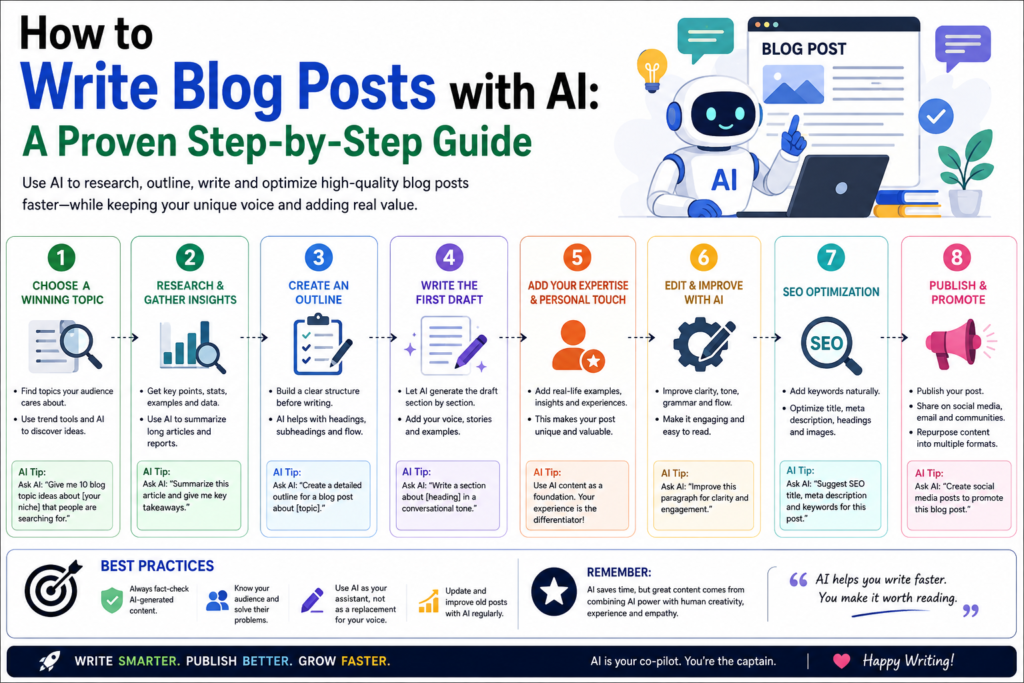
Writing blog posts used to take hours. Now, with AI tools like ChatGPT and Claude, you can create high-quality content in a fraction of the time.
But there’s a catch: AI-generated content that’s not edited and personalized will hurt your blog more than help it. Google’s algorithms detect low-quality AI content, and readers can tell when content lacks authenticity.
This guide shows you how to write blog posts with AI the right way.
Moreover, it helps you speed up the process while keeping the quality and personality that readers and search engines demand.
Why Use AI for Blog Writing?
Before we dive into the process, let’s be clear about what AI does well and what it doesn’t:
AI is great at:
- Generating first drafts quickly
- Overcoming writer’s block
- Creating outlines and structures
- Suggesting subheadings and sections
- Researching topics (with Claude or Perplexity)
- Rewriting and improving existing content
AI is NOT great at:
- Original insights and opinions
- Personal experiences and stories
- Current events (unless using web-browsing AI)
- Understanding your unique audience
- Creating content with genuine personality
The key is to use AI as a starting point, not the final product.
The 7-Step Process for Writing Blog Posts with AI
Step 1: Choose Your Topic and Keywords
Before opening ChatGPT, do your research:
- Identify your target keyword — Use free tools like Google Keyword Planner, Ubersuggest, or AnswerThePublic
- Check search intent — What are people looking for when they search this keyword?
- Analyze competition — What’s currently ranking? Can you do better?
- Define your angle — What unique perspective can you offer?
Example: For the keyword “best AI writing tools,” the search intent is informational — people want recommendations and comparisons. Your angle might be “for beginners” or “on a budget.”
Step 2: Create an Outline with AI
Ask ChatGPT or Claude to create an outline for your article:
Prompt:
Create a detailed outline for a blog post titled "10 Best AI Writing Tools for Beginners in 2026." The article should:- Target the keyword "best AI writing tools for beginners"- Be approximately 1500 words- Include an introduction, 10 tool reviews, comparison table, and conclusion- Each tool review should include: name, what it does, pros, cons, and pricing- Use H2 and H3 subheadings- Include a FAQ section at the endReview the outline and adjust it based on:
- Your knowledge of the tools
- What your audience actually wants to know
- Gaps in existing content you can fill
Step 3: Write the Introduction
The introduction is critical — it determines whether readers stay or leave.
Prompt:
Write an engaging introduction for a blog post about the best AI writing tools for beginners. Requirements:- Start with a hook (question, statistic, or relatable scenario)- Explain why AI writing tools matter for beginners- Preview what the article will cover- Keep it under 150 words- Tone: friendly and helpfulThen personalize it:
- Add your own experience or perspective
- Include a specific example or story
- Make it sound like YOU, not a robot
Step 4: Generate the Main Content Section by Section
Don’t generate the entire article at once. Work section by section:
Prompt for each tool review:
Write a review section for [Tool Name] as part of a "Best AI Writing Tools for Beginners" article.Include:- What the tool does (2-3 sentences)- Key features (3-5 bullet points)- Pros (3 points)- Cons (2 points)- Pricing- Who it's best for- One-sentence verdictTone: informative and balanced. Approximately 200 words.After each section:
- Add your personal experience with the tool
- Include real examples of output you’ve gotten
- Verify all information (features, pricing) is current
- Add your honest opinion
Step 5: Create Supporting Content
Use AI to generate:
- Comparison table — “Create a comparison table of these 10 tools with columns for: Tool Name, Key Feature, Free Tier, Price, Best For”
- FAQ section — “Generate 5 frequently asked questions about AI writing tools for beginners with concise answers”
- Conclusion — “Write a conclusion summarizing the top 3 picks and encouraging readers to try them”
Step 6: Edit and Personalize (THE MOST IMPORTANT STEP)
This is where you transform AI output into YOUR content:
Check for:
- Accuracy — Verify all facts, features, and pricing
- Personal voice — Add your opinions, experiences, and stories
- Usefulness — Is this actually helpful for your audience?
- Originality — Add insights that AI couldn’t generate
- Flow — Does the article read naturally from start to finish?
- SEO — Are keywords placed naturally? Are subheadings optimized?
- Grammar — Run through Grammarly or similar tool
- Length — Is it long enough to be comprehensive? (Aim for 1500+ words)
Personalization tips:
- Add screenshots of tools you’ve actually used
- Include your results or experiences
- Share specific examples
- Add your honest opinions (even if they differ from AI’s suggestions)
- Include stories from your own journey
Step 7: Optimize for SEO
Before publishing, optimize with RankMath or Yoast:
- Title tag — Include your focus keyword naturally
- Meta description — Write a compelling 150-160 character description
- URL slug — Keep it short and keyword-focused
- Header tags — Use H2 and H3 properly
- Internal links — Link to 2-3 other posts on your blog
- External links — Link to official tool websites
- Images — Add 2-3 relevant images with alt text
- Keyword density — Use your focus keyword 3-5 times naturally
AI Prompts for Different Blog Post Types
How-To Guide
Create a step-by-step guide for [topic]. Include:- Clear introduction explaining what readers will learn- Numbered steps with detailed instructions- Tips and warnings where relevant- Screenshots placeholder notes- Conclusion with next stepsTarget length: 1500 words. Tone: instructional and friendly.Listicle (Top 10)
Write a "Top 10 [Topic]" article. For each item:- Name and brief description- 3 key features or benefits- Pros and cons- Who it's best for- Rating out of 5Include introduction, comparison table, and conclusion.Comparison Article
Compare [Option A] vs [Option B] for [audience/purpose].Include:- Quick overview of each- Feature-by-feature comparison table- Pros and cons of each- Pricing comparison- Clear recommendation for different use casesReview Article
Write a detailed review of [product/tool/service].Include:- What it is and who it's for- Key features and how they work- Pros (3-5)- Cons (2-3)- Pricing details- Alternatives- Final verdict with ratingCommon Mistakes to Avoid
| Mistake | Why It’s Bad | Better Approach |
|---|---|---|
| Publishing AI output directly | Low quality, no personality | Always edit and personalize |
| Not verifying facts | Wrong information damages trust | Check all claims independently |
| Ignoring SEO | Content won’t rank | Optimize before publishing |
| No personal experience | Generic, unhelpful content | Add your own stories and examples |
| AI-detectable patterns | Google may penalize | Vary sentence structure, add personality |
| Skipping the outline | Disorganized, rambling content | Always outline first |
How to Make AI Content Undetectable
Google’s guidelines focus on content quality, not whether AI was used. The goal isn’t to “hide” AI use — it’s to create content that’s genuinely valuable:
- Add personal stories — AI can’t share your experiences
- Include original research — Survey your audience, test products yourself
- Use specific examples — Vague content is easily detected
- Inject personality — Write in YOUR voice, not AI’s default tone
- Add expert opinions — Quote real people and sources
- Include screenshots and images — Visual proof adds authenticity
- Update regularly — Fresh, current content signals quality
Recommended Workflow
For a 1500-word blog post:
| Step | Time | Tool |
|---|---|---|
| Research & keywords | 20 min | Google, Ubersuggest |
| Outline | 5 min | ChatGPT/Claude |
| Introduction | 5 min | AI + your editing |
| Main content (AI draft) | 15 min | ChatGPT/Claude |
| Personalization & editing | 30 min | Your brain |
| SEO optimization | 10 min | RankMath |
| Final review | 10 min | Grammarly + proofread |
| Total | ~95 min | — |
Compare this to writing from scratch (3-5 hours), and you’ve saved 2-4 hours while maintaining quality.
Final Thoughts
AI is a powerful tool for blog writing, but it’s not a magic button.
However, for how to write blog posts with AI, successful bloggers use it as a force multiplier.
They leverage its speed.
They add their own expertise, personality, and value.
Follow the process in this guide, and you’ll create better content faster. Your readers will appreciate the quality, and Google will reward the value.
Start your next blog post with AI today — and see how much faster you can publish without sacrificing quality.
If you enjoyed this article, you may also like:
- 5 AI Gateways That Offer Free Tokens in 2026
- How to Build a Humanoid Robot in 2026: Costs, Timeline & Complete Blueprint
- Best AI Research Tools in 2026: ChatGPT, Claude, Gemini & Perplexity
- Best AI Resume Builders in 2026 — Free
- ChatGPT Review — Is It Worth Paying For in 2026?
- 10 Best Free AI Tools You Should Use in 2026
- Best AI Video Generators in 2026 — Free and Paid
- Best AI for Students in 2026: Top 10 Tools for Learning
- How AI Learns From Humans to Build Physical Robots
Visit Aidacoit.com for more AI comparisons, practical AI tutorials, enterprise AI insights, and emerging technology trends.
Pingback: How to Use ChatGPT for Business — A Complete Beginner Guide - Aidacoit
Pingback: #post_titleAI Tools for Small Business Owners — Save 10 Hours/Week Aidacoit Aidacoit Aidacoit
Pingback: 10 Free AI Tools You Should Try in 2026 - Aidacoit
Pingback: 5 Best AI Coding Assistants in 2026 — Tested and Compared
Pingback: Why LangGraph Is So Popular in Enterprises
Pingback: Best AI Development Platforms in 2026 - Aidacoit
Pingback: AI Agent and LLM Frameworks Comparison 2026 - Aidacoit
Pingback: 10 AI Tools That Can Replace Hours of Manual Work Every Week (2026)
Pingback: Is AI Rilo Sold in 200 Cr.? What Is AI Rilo? Why Adobe Acquired This Indian AI Startup Within a Year of Launch - Aidacoit
Pingback: Is an AI Agent the Same as a Bot? Understanding the Key Differences in 2026 - Aidacoit