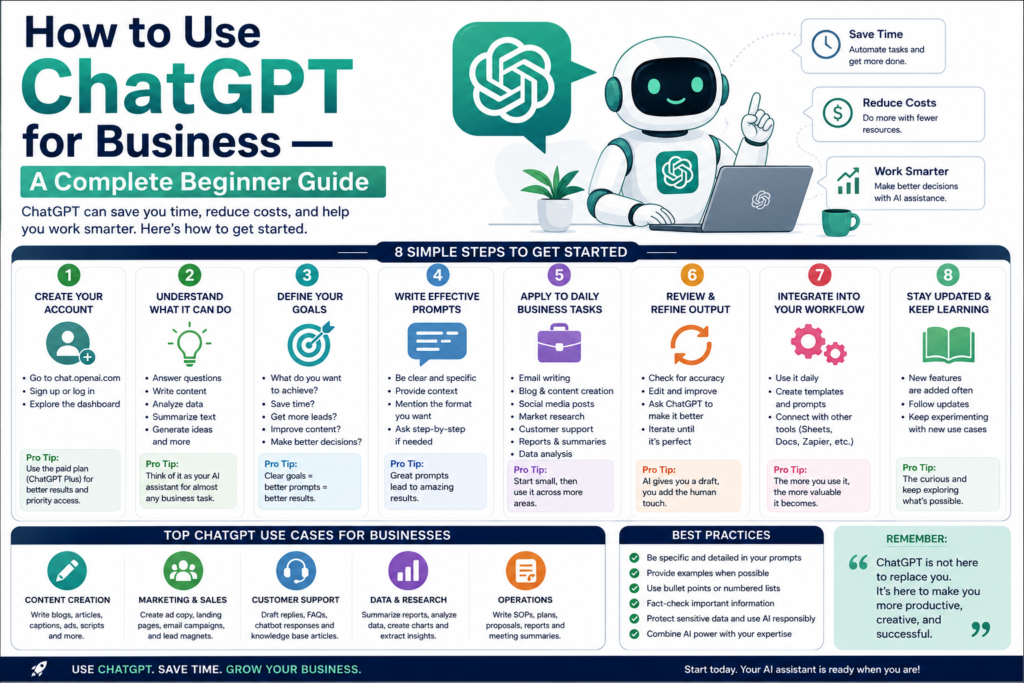
ChatGPT isn’t just for casual conversations — it’s becoming an essential business tool. From drafting emails to analyzing data, AI can save you hours of work every week. But if you’re new to ChatGPT, getting started can feel overwhelming.
This guide walks you through exactly how to use ChatGPT for your business, even if you’ve never used AI before.
Why Businesses Are Using ChatGPT
Before we get into the how, let’s understand the why:
- Time savings — Tasks that took hours now take minutes
- Cost efficiency — Do the work of a small team with AI assistance
- Consistency — Generate professional content every time
- 24/7 availability — ChatGPT never sleeps
- Scalability — Handle more work without hiring more people
According to recent surveys, over 60% of businesses now use AI tools in some capacity. Those that don’t risk falling behind.
Getting Started: Setting Up ChatGPT
Step 1: Create an Account
- Go to chat.openai.com
- Click “Sign Up”
- Create an account with your email, Google, or Microsoft account
- Verify your email
- You’re ready to start
Step 2: Understand the Interface
- New Chat — Start a fresh conversation
- Chat History — Access previous conversations on the left sidebar
- Model Selector — Choose between GPT-4o and GPT-4o mini (free tier)
- Message Box — Type your instructions here
Step 3: Learn the Basics of Prompting
Prompting is the art of giving ChatGPT clear instructions. Better prompts = better results.
Bad prompt: “Write about marketing”
Good prompt: “Write a 500-word email to potential customers introducing our new AI-powered CRM tool. The tone should be professional but friendly. Include a call-to-action to sign up for a free trial.”
10 Ways to Use ChatGPT for Business
1. Email Writing and Management
Stop staring at a blank screen. ChatGPT can:
- Draft customer emails
- Write follow-up messages
- Create cold outreach templates
- Respond to common inquiries
- Proofread and improve existing emails
Example prompt: “Write a professional follow-up email to a client who attended our product demo last week. Mention key features discussed and invite them to start a free trial.”
2. Content Marketing
Content is king, and ChatGPT is your content creation partner:
- Write blog posts and articles
- Create social media captions
- Generate video scripts
- Draft newsletter content
- Write product descriptions
Example prompt: “Write a 1200-word blog post titled ‘5 Ways AI Can Save Your Small Business Time and Money.’ Include practical examples and end with a call-to-action.”
3. Customer Support
Improve your customer service with AI assistance:
- Draft responses to common questions
- Create FAQ documents
- Write support templates
- Summarize customer feedback
- Generate troubleshooting guides
Example prompt: “Create a template response for customers who are experiencing login issues. Include step-by-step troubleshooting and escalate to human support if unresolved.”
4. Market Research
Use ChatGPT to analyze and understand your market:
- Summarize industry trends
- Analyze competitor positioning
- Generate survey questions
- Brainstorm market entry strategies
- Create buyer personas
Example prompt: “Create a detailed buyer persona for a SaaS project management tool targeting remote teams of 10-50 people. Include demographics, pain points, goals, and preferred communication channels.”
5. Sales and Lead Generation
Boost your sales efforts with AI-powered content:
- Write sales scripts
- Create pitch decks
- Draft proposal documents
- Generate objection-handling responses
- Write case studies
Example prompt: “Write a sales pitch for our project management software targeting marketing agencies. Highlight time-saving features, team collaboration, and pricing starting at $29/month.”
6. Social Media Management
Keep your social media active and engaging:
- Create weekly content calendars
- Write posts for LinkedIn, Twitter, Instagram
- Generate hashtags
- Draft responses to comments
- Create promotional content
Example prompt: “Create a 5-day LinkedIn content calendar for a B2B software company. Include post topics, opening hooks, and calls-to-action. Focus on thought leadership about remote work.”
7. Internal Communication
Improve how your team communicates:
- Draft company announcements
- Write meeting agendas
- Create onboarding documents
- Write HR policies
- Generate team updates
Example prompt: “Write a company-wide announcement about our new flexible work policy starting next month. Keep the tone positive and informative, and include key dates and FAQ.”
8. Data Analysis and Reporting
Make sense of your business data:
- Analyze spreadsheet data
- Create summary reports
- Identify trends and patterns
- Generate charts descriptions
- Write data-driven recommendations
Example prompt: “I’m going to share our sales data from Q1. Analyze the trends, identify our top-performing products, and suggest strategies for Q2.”
9. Brainstorming and Ideation
Break through creative blocks:
- Generate business name ideas
- Brainstorm product features
- Create marketing campaign ideas
- Develop new service offerings
- Explore expansion opportunities
Example prompt: “Brainstorm 10 content marketing campaign ideas for a B2B SaaS company targeting healthcare providers. Include themes, formats, and distribution channels.”
10. Training and Development
Upskill your team with AI assistance:
- Create training materials
- Develop onboarding guides
- Write standard operating procedures
- Generate quiz questions
- Build knowledge bases
Example prompt: “Create a comprehensive onboarding guide for new sales hires. Include company overview, tools training, sales process, and 30-60-90 day goals.”
Best Practices for Business Use
Do’s
- Always review AI output — ChatGPT is a starting point, not a final product
- Add your expertise — Combine AI drafts with your industry knowledge
- Protect sensitive data — Never input confidential client information
- Be specific — Detailed prompts get better results
- Iterate and refine — Ask ChatGPT to improve its own output
Don’ts
- Don’t publish without editing — AI content needs a human touch
- Don’t trust everything — Verify facts and statistics independently
- Don’t use for legal or medical advice — Always consult professionals
- Don’t share passwords or sensitive data — ChatGPT conversations aren’t private
- Don’t replace human judgment — AI assists decisions, it doesn’t make them
Common Mistakes to Avoid
| Mistake | Why It’s a Problem | Better Approach |
|---|---|---|
| Vague prompts | Generates generic output | Be specific about format, tone, length |
| Using first draft | May contain errors or inaccuracies | Always review and edit |
| Not providing context | AI doesn’t know your business | Include background information |
| Ignoring confidentiality | Risk of data leaks | Keep sensitive info private |
| Over-relying on AI | Loss of authentic voice | Use AI to enhance, not replace |
Measuring ROI from ChatGPT
Track these metrics to see if ChatGPT is helping your business:
- Time saved — How many hours per week?
- Content output — Are you publishing more?
- Response time — Are customer inquiries answered faster?
- Cost savings — How much would you have spent on freelancers?
- Revenue impact — Is better content generating more leads?
Many businesses report saving 5-15 hours per week on content creation alone. At $50/hour, that’s $250-$750 worth of time saved weekly.
Getting Your Team on Board
If you’re introducing ChatGPT to your team:
- Start small — Begin with email writing or social media posts
- Provide training — Share prompt templates and best practices
- Set guidelines — Define what’s appropriate to use AI for
- Encourage experimentation — Let team members explore use cases
- Share wins — Celebrate time saved and quality improvements
Final Thoughts
ChatGPT is one of the most powerful business tools available today, and it’s free to start. Whether you’re a solopreneur or part of a large team, AI can help you work faster, communicate better, and focus on what matters most.
The key is to start using it today. Pick one task from this guide, try it with ChatGPT, and see the results for yourself. You’ll quickly understand why millions of businesses are making AI part of their daily workflow.
If you enjoyed this article, you may also like:
- 5 AI Gateways That Offer Free Tokens in 2026
- How to Build a Humanoid Robot in 2026: Costs, Timeline & Complete Blueprint
- Best AI Research Tools in 2026: ChatGPT, Claude, Gemini & Perplexity
- Best AI Resume Builders in 2026 — Free
- ChatGPT Review — Is It Worth Paying For in 2026?
- 10 Best Free AI Tools You Should Use in 2026
- Best AI Video Generators in 2026 — Free and Paid
- Best AI for Students in 2026: Top 10 Tools for Learning
- How AI Learns From Humans to Build Physical Robots
- How AI Learns From Humans to Build Physical Robots
- Why LangGraph Is So Popular in Enterprises — Pros, Cons & Real-World Use Cases in 2026
- ChatGPT vs Gemini vs Claude vs Grok 2026
- DeepSeek V4 vs Grok 4 vs Claude Opus 5 vs Nvidia Nemotron vs Gemini 2.5 Pro — The Ultimate AI Model Comparison for 2026
- AI Agent and LLM Frameworks Comparison 2026: LangChain vs LangGraph vs CrewAI vs AutoGen vs LlamaIndex vs Semantic Kernel
- Best Multi-Agent AI Platforms in 2026: CrewAI vs AutoGen vs LangGraph vs OpenAI Agents SDK vs Agno vs Semantic Kernel
- Best AI Development Platforms in 2026: OpenAI API vs Anthropic API vs Google AI Studio vs Vertex AI vs Azure AI Foundry vs AWS Bedrock vs Hugging Face
- Exploring the Latest AI Tools and Technologies
- How to Use ChatGPT for Business — A Complete Beginner Guide
- How to Write Blog Posts with AI — A Proven Step-by-Step Guide
- Best AI Coding Assistants 2026
- Ultimate Guide to the 10 Best AI Chatbots in 2026
- Claude AI Review — Best ChatGPT Alternative in 2026
- Jasper AI Review — Is It Worth $49/Month in 2026?
- How to Use AI for Social Media Marketing — Complete Guide
- AI Tools for Small Business Owners — Save 10 Hours/Week
- AI Tools for Content Creators
- Best AI Music Generators in 2026 — Create Songs in Minutes
- AI Design Tools Compared: Canva AI vs Adobe Firefly vs Midjourney
- Best AI Writing Tools 2026
- 10 Free AI Tools You Should Try in 2026
- Best AI Image Generators in 2026 — Free and Paid Compared
- Best AI Productivity Tools in 2026 — Work Smarter, Not Harder
- ChatGPT vs Claude in 2026 — Which AI Is Actually Better?
Visit Aidacoit.com for more AI comparisons, practical AI tutorials, enterprise AI insights, and emerging technology trends.
Pingback: ChatGPT vs Claude in 2026 — Which AI Is Actually Better?
Pingback: ChatGPT vs Gemini vs Claude vs Grok – Which AI Should You Actually Use in 2026? - Aidacoit
Pingback: ChatGPT vs Gemini vs Claude vs Grok (2026) – Ultimate AI Comparison Guide
Pingback: 10 AI Tools That Can Replace Hours of Manual Work Every Week (2026)
Pingback: Is AI Rilo Sold in 200 Cr.? What Is AI Rilo? Why Adobe Acquired This Indian AI Startup Within a Year of Launch - Aidacoit