Creating content consistently sounds easy until you actually have to do it.
A YouTube creator needs video ideas, scripts, thumbnails, titles, descriptions and social media posts. A blogger needs topics, research, outlines, drafts and images. Social media creators need captions, short-form videos, graphics and content calendars.
The challenge isn’t always creativity.
It’s the amount of repetitive work around creativity.
That’s where artificial intelligence can help.
In 2026, AI tools can assist content creators with research, writing, video editing, graphic design, transcription, audio production and content repurposing.
But there is an important distinction:
AI should help you create content faster — not replace your unique voice.
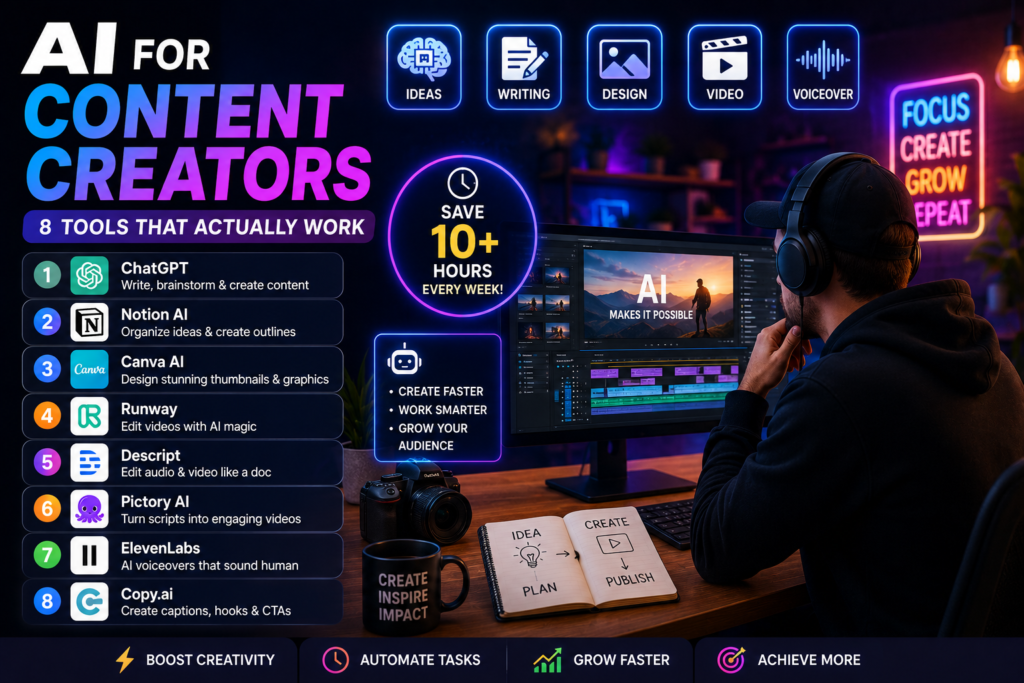
In this guide, we’ll look at 8 AI tools that are genuinely useful for content creators, what each tool does best, and how you can use them in a practical content workflow.
What Can AI Do for Content Creators?
AI can help with almost every stage of the content creation process.
For example:
Idea → Research → Script → Recording → Editing → Thumbnail → Publishing → Repurposing
Instead of spending hours on every step manually, creators can use AI to accelerate the repetitive parts.
Some common uses include:
- Generating content ideas
- Researching topics
- Creating video scripts
- Writing blog outlines
- Generating captions
- Editing videos
- Removing filler words
- Creating subtitles
- Designing thumbnails
- Generating images
- Transcribing videos
- Repurposing long videos into short clips
- Improving titles and descriptions
The key is choosing tools based on your workflow rather than collecting dozens of AI subscriptions.
1. ChatGPT — Your Content Planning Assistant
ChatGPT is one of the most versatile AI tools available to content creators.
It can help you move from a vague idea to a structured piece of content.
For example, you can give it a topic such as:
“How AI is changing small businesses”
and ask it to create:
- Blog post ideas
- YouTube video ideas
- Video hooks
- Script outlines
- Social media captions
- FAQs
- Newsletter ideas
- Interview questions
- Content calendars
You can also use it to transform existing content.
For example:
1 YouTube video → 1 blog post → 5 LinkedIn posts → 10 short-form video ideas → newsletter
That makes AI particularly useful for creators who want to publish across multiple platforms.
Best use
Content planning, research assistance, outlines, scripting and repurposing.
Best for
Bloggers, YouTubers, LinkedIn creators, newsletter writers and social media creators.
Important tip
Don’t simply ask:
“Write a YouTube script.”
Give the AI your audience, topic, tone, personal experience and key points.
The more context you provide, the more useful the output becomes.
2. Canva — AI-Powered Design for Creators
You don’t need to be a professional graphic designer to create attractive content.
Canva provides templates and AI-powered features that can help creators produce:
- YouTube thumbnails
- Instagram posts
- Reels graphics
- Presentations
- Infographics
- Posters
- Blog graphics
- Social media banners
- Promotional material
For creators who publish frequently, reusable templates can make a huge difference.
Instead of designing every post from scratch, create a template once and modify the headline, image and supporting information.
Best use
Thumbnails, social media graphics and visual content.
Best for
YouTubers, bloggers, Instagram creators and small businesses.
Time-saving idea
Create five reusable templates:
- Educational post
- Quote post
- News/update post
- Product promotion
- Video promotion
Now your next social media post may take minutes instead of starting from a blank canvas.
3. CapCut — AI Video Editing for Short-Form Content
Video editing is one of the most time-consuming parts of content creation.
CapCut provides tools designed for fast video editing and short-form content production.
Creators can use features such as:
- Automatic captions
- Background removal
- Video effects
- Text overlays
- Transitions
- AI-assisted editing features
- Short-form video templates
This is particularly useful for creators producing content for:
- YouTube Shorts
- Instagram Reels
- TikTok
- Facebook Reels
Best use
Fast short-form video production.
Best for
Creators who publish frequently and don’t want to spend hours editing every short video.
Practical workflow
Record a 10-minute video.
Then:
Long video → Identify useful sections → Create short clips → Add captions → Add headline → Publish
One recording can therefore become multiple pieces of content.
4. Descript — Edit Videos Like a Document
Traditional video editing requires working with timelines, tracks and clips.
Descript takes a different approach.
It allows creators to work with a transcription of the video and edit the content through text.
This can be extremely useful for:
- Podcasts
- Interviews
- YouTube videos
- Tutorials
- Webinars
- Educational content
If you remove a sentence from the transcript, the corresponding portion of the video can be removed as well.
AI-assisted features can also help with transcription and editing tasks.
Best use
Talking-head videos, podcasts and interviews.
Best for
Creators who spend significant time editing spoken-word content.
Why it’s useful
Instead of searching through a timeline to find a particular sentence, you can search the transcript.
That can dramatically simplify editing.
5. ElevenLabs — AI Voice and Audio Tools
Audio quality matters more than many creators realize.
ElevenLabs provides AI-powered voice and audio tools that can be useful for:
- Voiceovers
- Narration
- Educational videos
- audiology-style content
- Character voices
- Multilingual content
For creators producing faceless videos, voiceovers can be particularly useful.
However, creators should be careful about using AI-generated voices that imitate real people without permission.
Best use
Voiceovers and narration.
Best for
Faceless YouTube channels, educational creators, video producers and international content creators.
Important consideration
Always check the licensing terms of the specific plan and voice you are using, particularly if your content is monetized.
6. Adobe Firefly — Generate and Edit Visuals
Content creators constantly need images.
Sometimes you need a very specific visual that isn’t available in your existing image library.
AI image-generation tools can help create visual concepts from text prompts.
Adobe Firefly can be useful for:
- Concept images
- Marketing graphics
- Backgrounds
- Creative compositions
- Image variations
- Visual experimentation
For example, instead of searching for a generic stock image of “a futuristic office,” you can generate a visual closer to your specific concept.
Best use
Creative visuals and image generation/editing.
Best for
Bloggers, marketers, YouTubers, designers and social media creators.
Important tip
Don’t use AI-generated images simply because you can.
A good visual should support the story or idea you’re communicating.
7. Grammarly — Improve Your Writing
Even experienced writers make mistakes.
Grammarly can help creators improve:
- Grammar
- Spelling
- Sentence clarity
- Tone
- Word choice
- Readability
This can be useful when creating:
- Blog posts
- Newsletters
- Emails
- LinkedIn posts
- YouTube descriptions
- Website copy
AI writing assistants can also suggest alternative ways to express an idea.
But there is an important rule:
Don’t let AI remove your personality.
A perfectly polished paragraph can still sound generic.
Your experience, opinions and storytelling are what make your content different from thousands of AI-generated articles.
8. OpusClip — Turn Long Videos Into Short Clips
One of the biggest opportunities for creators is content repurposing.
Imagine you’ve recorded a 30-minute interview.
Instead of publishing only the original video, you can turn it into:
- YouTube Shorts
- Instagram Reels
- TikTok videos
- LinkedIn clips
- Quote graphics
- Blog content
OpusClip is designed to help identify potentially useful moments in longer videos and turn them into short-form clips.
Best use
Repurposing long-form videos into short-form content.
Best for
YouTubers, podcasters, interview creators and educators.
The big advantage
You create the content once.
AI helps you distribute it in multiple formats.
The Best AI Tool Depends on Your Content
There isn’t one AI tool that is best for every creator.
Here’s a simple comparison:
| Tool | Best For | Creator Type |
|---|---|---|
| ChatGPT | Ideas, research & scripts | Almost everyone |
| Canva | Graphics & thumbnails | Social creators |
| CapCut | Video editing | Short-form creators |
| Descript | Transcript-based editing | Podcasters & YouTubers |
| ElevenLabs | Voiceovers | Video creators |
| Adobe Firefly | AI visuals | Visual creators |
| Grammarly | Writing improvement | Bloggers & writers |
| OpusClip | Video repurposing | YouTubers & podcasters |
How to Build an AI Content Workflow
The real power of AI doesn’t come from using individual tools.
It comes from connecting them into a workflow.
For example, a YouTube creator could use:
Step 1: Idea
Use ChatGPT to brainstorm topics.
↓
Step 2: Research
Research the topic and identify important questions the audience is asking.
↓
Step 3: Script
Use ChatGPT to create an outline and first draft.
↓
Step 4: Recording
Record the video using your own voice and personality.
↓
Step 5: Editing
Use Descript or CapCut to speed up editing and captioning.
↓
Step 6: Thumbnail
Use Canva to create the thumbnail.
↓
Step 7: Repurpose
Use OpusClip to identify short-form clips.
↓
Step 8: Social Media
Use ChatGPT to create platform-specific captions and posts.
One piece of content can now become an entire content package.
Don’t Let AI Make Your Content Generic
This is perhaps the most important point.
If you ask AI to:
“Write a 1,000-word article about AI.”
you may get something technically correct but extremely generic.
Thousands of other creators can generate something similar.
Instead, add your own:
- Experience
- Examples
- Opinions
- Case studies
- Mistakes
- Lessons
- Data
- Personal observations
- Industry knowledge
For example:
Instead of:
“AI can help businesses save time.”
say:
“I tested an AI-powered workflow for customer enquiries and reduced a repetitive 30-minute daily task to a few minutes.”
The second statement contains experience.
That’s what makes content valuable.
AI Content Does Not Mean Automatic Content
There is a difference between:
AI-generated content
and
AI-assisted content.
AI-generated content is created largely by the machine.
AI-assisted content uses AI to accelerate your process while the creator remains responsible for:
- Accuracy
- Originality
- Experience
- Opinions
- Editing
- Fact-checking
- Final quality
The second approach is generally much more sustainable.
How Much Time Can AI Save?
The answer depends on your workflow.
A creator who spends several hours every week editing videos may save more time from AI video tools than someone who primarily publishes text.
A possible workflow might look like this:
| Task | Traditional Process | AI-Assisted Process |
|---|---|---|
| Idea generation | 1 hour | 20 minutes |
| Content outline | 45 minutes | 15 minutes |
| Script preparation | 2 hours | 45 minutes |
| Video transcription | 30 minutes | 5 minutes |
| Caption creation | 45 minutes | 10 minutes |
| Repurposing | 2 hours | 30 minutes |
These are illustrative examples, not guaranteed results.
The biggest savings usually come from repetitive tasks rather than from replacing the creative part of the process.
Are AI Tools Worth Paying For?
Not every creator needs a paid AI subscription.
Start by identifying the biggest bottleneck in your workflow.
If writing is your problem, start with an AI writing assistant.
If video editing is consuming your time, look at AI video tools.
If you spend hours creating graphics, consider an AI design platform.
If you’re producing long videos but struggling to create Shorts, use a video repurposing tool.
A simple rule
Don’t buy an AI tool because it’s popular.
Buy it because it solves a problem that costs you time or money.
AI Tools for Different Types of Creators
YouTubers
Recommended combination:
ChatGPT + Canva + CapCut/Descript + OpusClip
Useful for:
- Ideas
- Scripts
- Thumbnails
- Editing
- Shorts
- Descriptions
Bloggers
Recommended combination:
ChatGPT + Grammarly + Canva
Useful for:
- Research assistance
- Outlines
- Drafting
- Editing
- Blog graphics
Podcasters
Recommended combination:
Descript + ChatGPT + OpusClip
Useful for:
- Transcription
- Editing
- Show notes
- Social clips
- Repurposing
Social Media Creators
Recommended combination:
ChatGPT + Canva + CapCut
Useful for:
- Content ideas
- Captions
- Graphics
- Reels
- Short videos
Final Verdict
AI has changed content creation, but the biggest opportunity isn’t creating content with one click.
It’s creating more from the content you already produce.
A single podcast can become:
1 full episode + 5 short videos + 10 social posts + 1 newsletter + 1 blog article.
A single YouTube video can become:
1 long-form video + multiple Shorts + social posts + a blog article + an email.
That’s where AI becomes genuinely powerful.
The 8 tools covered in this guide each solve a different part of the content creation process:
ChatGPT — Ideas and writing
Canva — Design
CapCut — Video editing
Descript — Transcript-based editing
ElevenLabs — Voice and audio
Adobe Firefly — Visual creation
Grammarly — Writing improvement
OpusClip — Content repurposing
You don’t need all eight.
Start with one tool that solves your biggest problem, build it into your workflow, measure the time saved, and then add another tool when necessary.
The future of content creation isn’t AI instead of creators.
It’s creators using AI to spend less time on repetitive work and more time being creative.
Frequently Asked Questions
What is the best AI tool for content creators?
There isn’t one universal winner. ChatGPT is a strong general-purpose starting point, while tools such as Canva, CapCut, Descript and OpusClip are better suited to specific parts of the content workflow.
Can AI create YouTube videos?
AI can assist with ideas, scripts, voiceovers, editing, captions, thumbnails and repurposing. However, high-quality videos still benefit from human creativity, experience and editorial judgment.
Can AI help me create social media content?
Yes. AI can help generate ideas, captions, images, short videos, content calendars and variations of existing content.
Can AI replace content creators?
AI can automate many repetitive tasks, but it doesn’t eliminate the need for creativity, personal experience, storytelling, judgment and audience understanding.
Are AI-generated articles good for SEO?
AI itself is not a guarantee of search visibility. Useful content should provide genuine value, be accurate, original and written for people rather than simply generated to manipulate search rankings.
Should I use AI for all my content?
No. Use AI where it saves time or improves your workflow. Keep your personal experiences, opinions, expertise and creative decisions at the center of your content.
Conclusion
Content creators don’t need more tools.
They need better workflows.
Choose one repetitive task that is slowing you down.
Use AI to make it faster.
Then reinvest the saved time into what AI cannot easily replace:
your ideas, your experience and your unique voice.
If you enjoyed this article, you may also like:
- 5 AI Gateways That Offer Free Tokens in 2026
- How to Build a Humanoid Robot in 2026: Costs, Timeline & Complete Blueprint
- Best AI Research Tools in 2026: ChatGPT, Claude, Gemini & Perplexity
- Best AI Resume Builders in 2026 — Free
- ChatGPT Review — Is It Worth Paying For in 2026?
- 10 Best Free AI Tools You Should Use in 2026
- Best AI Video Generators in 2026 — Free and Paid
- Best AI for Students in 2026: Top 10 Tools for Learning
- How AI Learns From Humans to Build Physical Robots
- How AI Learns From Humans to Build Physical Robots
- Why LangGraph Is So Popular in Enterprises — Pros, Cons & Real-World Use Cases in 2026
- ChatGPT vs Gemini vs Claude vs Grok 2026
- DeepSeek V4 vs Grok 4 vs Claude Opus 5 vs Nvidia Nemotron vs Gemini 2.5 Pro — The Ultimate AI Model Comparison for 2026
- AI Agent and LLM Frameworks Comparison 2026: LangChain vs LangGraph vs CrewAI vs AutoGen vs LlamaIndex vs Semantic Kernel
- Best Multi-Agent AI Platforms in 2026: CrewAI vs AutoGen vs LangGraph vs OpenAI Agents SDK vs Agno vs Semantic Kernel
- Best AI Development Platforms in 2026: OpenAI API vs Anthropic API vs Google AI Studio vs Vertex AI vs Azure AI Foundry vs AWS Bedrock vs Hugging Face
- Exploring the Latest AI Tools and Technologies
- How to Use ChatGPT for Business — A Complete Beginner Guide
- How to Write Blog Posts with AI — A Proven Step-by-Step Guide
- Best AI Coding Assistants 2026
- Ultimate Guide to the 10 Best AI Chatbots in 2026
- Claude AI Review — Best ChatGPT Alternative in 2026
- Jasper AI Review — Is It Worth $49/Month in 2026?
- How to Use AI for Social Media Marketing — Complete Guide
- AI Tools for Small Business Owners — Save 10 Hours/Week
- AI Tools for Content Creators
- Best AI Music Generators in 2026 — Create Songs in Minutes
- AI Design Tools Compared: Canva AI vs Adobe Firefly vs Midjourney
- Best AI Writing Tools 2026
- 10 Free AI Tools You Should Try in 2026
- Best AI Image Generators in 2026 — Free and Paid Compared
- Best AI Productivity Tools in 2026 — Work Smarter, Not Harder
- ChatGPT vs Claude in 2026 — Which AI Is Actually Better?
Visit Aidacoit.com for more AI comparisons, practical AI tutorials, enterprise AI insights, and emerging technology trends.