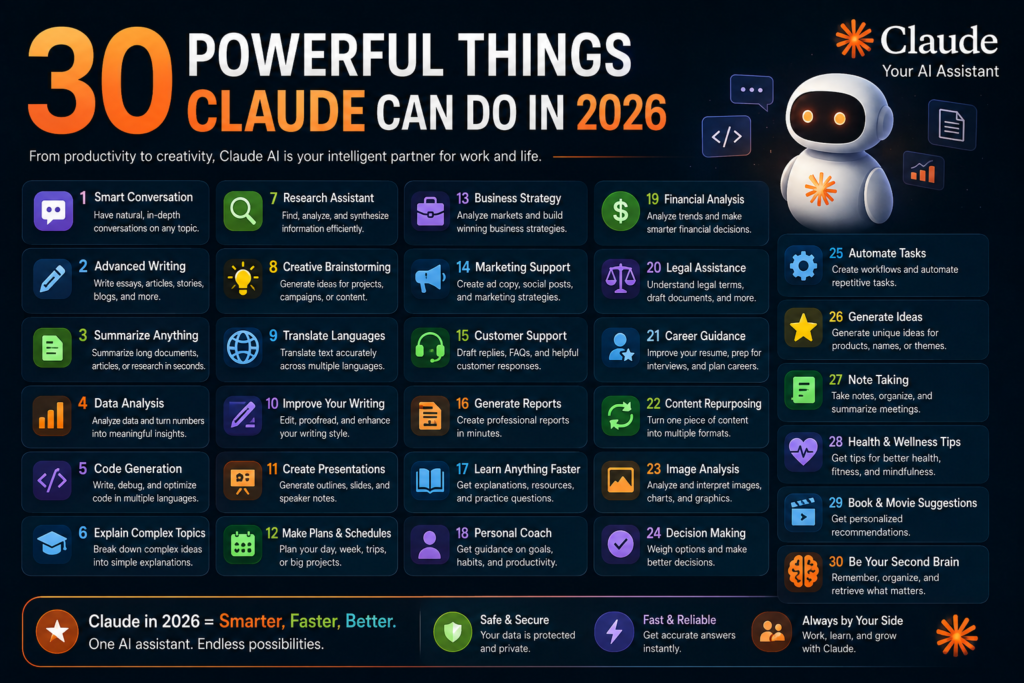
Artificial Intelligence has evolved far beyond simple chatbots. Modern AI assistants can write articles, build software, analyze documents, automate workflows, conduct research, and even function as autonomous AI agents.
Among the leading AI platforms available today, Claude AI by Anthropic has emerged as one of the most capable AI assistants for professionals, developers, content creators, startups, and enterprises.
Many people ask:
“What can Claude actually do?”
The short answer is: a lot more than most users realize.
From writing SEO articles to building production-ready software applications, Claude has become a powerful productivity tool used across multiple industries. Claude’s recent capabilities include advanced coding assistance, agent-based workflows, integrations, long-context document analysis, and collaborative AI-powered development.
This guide explores the most practical and valuable ways to use Claude AI in 2026.
What Is Claude AI?
Claude is an AI assistant developed by Anthropic that specializes in reasoning, writing, coding, research, document analysis, and enterprise workflows.
Unlike traditional chatbots, Claude is designed to handle complex tasks involving multiple steps, large amounts of information, and long-term workflows. Recent Claude capabilities extend into software engineering, AI agents, business automation, and collaborative development environments.
1. Write High-Quality Blog Articles
One of Claude’s strongest abilities is content creation.
You can use Claude to write:
- SEO articles
- Product reviews
- Landing pages
- Tutorials
- Technical blogs
- Industry reports
- Marketing content
Many content creators use Claude to generate long-form articles while maintaining readability and structure.
Example
Prompt:
“Write a 2,000-word SEO article about AI Agents.”
Claude can generate:
- SEO title
- Meta description
- Headings
- FAQs
- Internal linking suggestions
2. Generate Social Media Content
Claude can create:
- LinkedIn posts
- Twitter/X posts
- Facebook content
- Instagram captions
- YouTube descriptions
- Hashtags
This helps creators maintain a consistent publishing schedule.
3. Perform Deep Research
Claude can analyze large amounts of information and create structured summaries.
Examples:
- Market research
- Industry analysis
- Competitor research
- Technology trends
- Startup opportunities
This makes Claude useful for professionals and entrepreneurs.
4. Analyze Large Documents
One area where Claude excels is document analysis.
It can review:
- Contracts
- PDFs
- Research papers
- Business reports
- Policy documents
- Legal agreements
Instead of manually reading hundreds of pages, users can ask Claude to extract key insights and summaries.
5. Build Software Applications
Claude has become a popular AI coding assistant.
Developers use Claude to:
- Build web applications
- Create APIs
- Generate backend code
- Build SaaS products
- Create mobile apps
Claude Code is designed to understand entire codebases, edit files, run commands, and assist throughout the software development lifecycle.
6. Debug Code Faster
Developers can paste:
- Error logs
- Stack traces
- Application issues
Claude can identify likely causes and propose solutions.
Modern Claude coding workflows include debugging, code analysis, testing, and project-wide refactoring.
7. Understand Entire Codebases
Unlike traditional coding assistants that only focus on a single file, Claude can analyze large projects and understand relationships across multiple files.
This allows developers to:
- Explore unfamiliar projects
- Understand architecture
- Learn existing systems faster
8. Create AI Agents
One of the biggest trends in AI is agentic workflows.
Claude can help build AI agents that:
- Research information
- Execute workflows
- Analyze data
- Coordinate tasks
- Automate repetitive work
Anthropic has expanded Claude’s agent capabilities with managed agents, orchestration features, memory systems, and workflow automation tools.
9. Run Multi-Agent Systems
Modern Claude environments support multi-agent orchestration where a lead agent coordinates specialized subagents working in parallel on tasks.
Use cases include:
- Software development
- Research projects
- Content production
- Enterprise workflows
10. Create Business Reports
Claude can generate:
- Executive summaries
- Strategy documents
- Quarterly reports
- Market analysis
- Business proposals
This significantly reduces administrative work.
11. Write Professional Emails
Claude can draft:
- Sales emails
- Customer support responses
- HR communications
- Follow-up messages
- Business correspondence
12. Generate Technical Documentation
Developers often use Claude for:
- API documentation
- User manuals
- System architecture documents
- Deployment guides
Good documentation improves team productivity.
13. Build Internal Business Tools
Claude can help create:
- Dashboards
- Workflow tools
- CRM extensions
- Automation utilities
- Reporting systems
This is especially valuable for startups.
14. Create Presentations
Claude can assist with:
- Investor pitch decks
- Business presentations
- Technical talks
- Conference presentations
15. Learn Programming
Claude is a strong learning companion.
It can teach:
- Python
- JavaScript
- Java
- SQL
- Cloud computing
- AI engineering
By explaining concepts step-by-step, it helps beginners learn faster.
16. Analyze Data
Claude can help interpret:
- CSV files
- Reports
- Spreadsheets
- Structured datasets
It can identify:
- Trends
- Patterns
- Insights
- Recommendations
17. Translate Content
Claude supports multilingual content generation and translation.
Use cases include:
- Website localization
- Global marketing
- International business communications
18. Help With SEO
Claude can generate:
- SEO titles
- Meta descriptions
- Keyword clusters
- Content outlines
- FAQ sections
This makes it useful for bloggers and marketers.
19. Automate Development Work
Claude Code can automate many repetitive engineering tasks, including:
- Writing tests
- Fixing lint issues
- Updating dependencies
- Generating release notes
- Managing pull requests
These capabilities help developers focus on higher-value work.
20. Create and Manage Pull Requests
Claude can interact with Git workflows by creating commits, generating commit messages, and helping manage pull requests.
This accelerates software delivery.
21. Work Across Multiple Platforms
Claude can be used through:
- Browser
- Desktop applications
- IDEs
- Terminals
- Developer environments
This flexibility supports a wide range of workflows.
22. Understand Images
Claude supports visual understanding.
It can analyze:
- Screenshots
- Charts
- Diagrams
- Documents
- Images
This makes it useful for troubleshooting and analysis.
23. Brainstorm Startup Ideas
Entrepreneurs use Claude to:
- Validate ideas
- Research markets
- Build business plans
- Identify opportunities
Claude acts as a strategic thinking partner.
24. Improve Customer Support
Businesses can use Claude for:
- Ticket responses
- Customer service automation
- Knowledge base creation
- FAQ generation
25. Enterprise Knowledge Management
Large organizations use Claude to:
- Search internal knowledge
- Summarize documents
- Improve employee productivity
- Automate workflows
Anthropic continues to expand enterprise controls and governance features.
Claude for Developers: Why It Is So Popular
Claude has become particularly popular among developers because it can:
- Understand entire repositories
- Build features
- Fix bugs
- Run tests
- Generate documentation
- Automate coding workflows
Claude Code operates as an agentic development assistant capable of working across multiple files and tools while verifying results.
Who Should Use Claude?
Students
- Learning
- Research
- Assignments
- Skill development
Bloggers
- Content creation
- SEO optimization
- Social media content
Developers
- Coding
- Debugging
- Testing
- Automation
Startups
- Product development
- Business planning
- Market research
Enterprises
- Knowledge management
- Process automation
- Internal productivity
Final Verdict
Claude AI has evolved from a simple chatbot into a powerful productivity platform. Whether you want to write content, conduct research, analyze documents, build software, automate workflows, or create AI agents, Claude provides tools that can dramatically improve efficiency.
For developers, Claude’s coding capabilities are among its strongest advantages. For businesses, its document analysis and automation features can save significant time. For creators, it offers a reliable way to generate high-quality content at scale.
As AI continues to advance, Claude is becoming an increasingly valuable assistant for individuals, startups, and enterprises looking to work smarter and move faster.
Explore More AI Guides on Aidacoit
If you enjoyed this article, you may also like:
- 5 AI Gateways That Offer Free Tokens in 2026
- How to Build a Humanoid Robot in 2026: Costs, Timeline & Complete Blueprint
- Best AI Research Tools in 2026: ChatGPT, Claude, Gemini & Perplexity
- Best AI Resume Builders in 2026 — Free
- ChatGPT Review — Is It Worth Paying For in 2026?
- 10 Best Free AI Tools You Should Use in 2026
- Best AI Video Generators in 2026 — Free and Paid
- Best AI for Students in 2026: Top 10 Tools for Learning
- How AI Learns From Humans to Build Physical Robots
Visit Aidacoit.com for more AI comparisons, practical AI tutorials, enterprise AI insights, and emerging technology trends.